"Exclude" and "Does not contain" in segment | Community
Skip to main content
Level 7
July 18, 2018
Solved

"Exclude" and "Does not contain" in segment

  • July 18, 2018
  • 4 replies
  • 20943 views

Hello guys,

Is there anyone can help to explain the difference of "Exclude" and "Does not contain" in segment, visit level?

The purpose is to get result for all visited pages that "during the visits, never visited the page name: coupon".

E.G.

Visit1: index > product > coupon > deal

Visit2: index > product > deal

Visit3: index > product > compare > deal

then the result I expect is:

index: 2

Product: 2

compare: 1

deal: 2

But it seems non of the segments is right.

The result I get (the 2nd segment):

index: 3

Product: 3

Coupon: 0

compare: 1

deal: 3

1st time, I use the segment: visit level, pagename does not contain "coupon". but I still can see page: "coupon" is listed with visits.

2nd time, I use the segment: visit level

Please help to clarify.

Thanks.

H
This post is no longer active and is closed to new replies. Need help? Start a new post to ask your question.
Best answer by Hyder_Ziaee

The condition operators affects the condition itself, which primarily are hit based (exceptions are present)

The exclude/include affect based on the container level - hit/visit/visitor

I am going to take the example I had used in Adobe summit to explain:

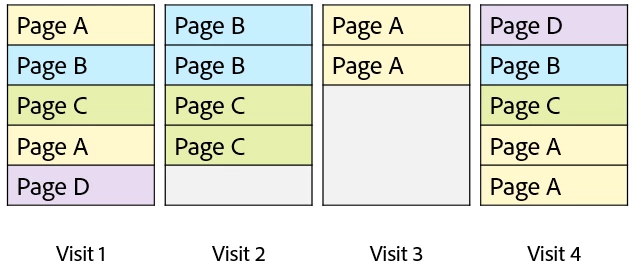
Suppose there are 4 visits with the following pages seen:

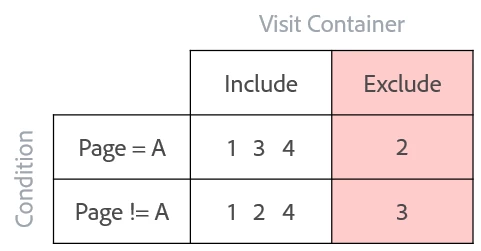
This is the output you will see when you use the combination of operator and visit based container

To explain further, each hit is going to be analyzed against the condition to see if it matches.

  • When an include container is used, it takes all the content of the visit if any hit matches the condition within the visit. This will not exclude if the condition doesn't match.
  • When an exclude container is used, it excludes all the content of the visit if any hit matches the condition within the visit. This will not include content if the condition doesn't match.

I am better at explaining it orally. Hope this helps.

Now lets look at your question: "The purpose is to get result for all visited pages that "during the visits, never visited the page name: coupon".

For this you want exclude all visits if the page "coupon" is present. So you will be using the following:

Container level: Visit

Container setting: Exclude

condition: Page contains coupon

-Hyder

4 replies

Hyder_Ziaee
Adobe Employee
Hyder_ZiaeeAdobe EmployeeAccepted solution
Adobe Employee
July 18, 2018

The condition operators affects the condition itself, which primarily are hit based (exceptions are present)

The exclude/include affect based on the container level - hit/visit/visitor

I am going to take the example I had used in Adobe summit to explain:

Suppose there are 4 visits with the following pages seen:

This is the output you will see when you use the combination of operator and visit based container

To explain further, each hit is going to be analyzed against the condition to see if it matches.

  • When an include container is used, it takes all the content of the visit if any hit matches the condition within the visit. This will not exclude if the condition doesn't match.
  • When an exclude container is used, it excludes all the content of the visit if any hit matches the condition within the visit. This will not include content if the condition doesn't match.

I am better at explaining it orally. Hope this helps.

Now lets look at your question: "The purpose is to get result for all visited pages that "during the visits, never visited the page name: coupon".

For this you want exclude all visits if the page "coupon" is present. So you will be using the following:

Container level: Visit

Container setting: Exclude

condition: Page contains coupon

-Hyder

H_LAuthor
Level 7
August 17, 2018

Hi Hyder,

Sorry that I just get a chance to login back and check your reply.

It's fairly clear and answered my question.

THANK YOU!

H

Level 2
July 9, 2019

What if the HIT container is used for the same operators and conditions.

Page=A

Page!=A

container = HIT.

What would be the results in that case.

Level 2
March 5, 2021

This condition will not produce any output. A single page can be viewed within a hit if it's a pageview call.

H_LAuthor
Level 7
July 15, 2019

It's up to which dimensions and metrics are about to brokendown.

The report will return no result or results with 0 (zero) value in metrics