When you create a sequential segment, it gives you additional options in the top right - include all, include only before, and include only after. This additional logic lets you limit what gets returned.
The default is to include all. This means that Adobe will use your segment logic (A then B), and look for a match. If you have a person level container, it will find a person that has done A then B, and then return ALL of their information, regardless if it happens before of after the sequence of events you are looking for.
If you change it to include only after, this will look within a person for that sequence (A then B) and then return everything that happened after that sequence took place.
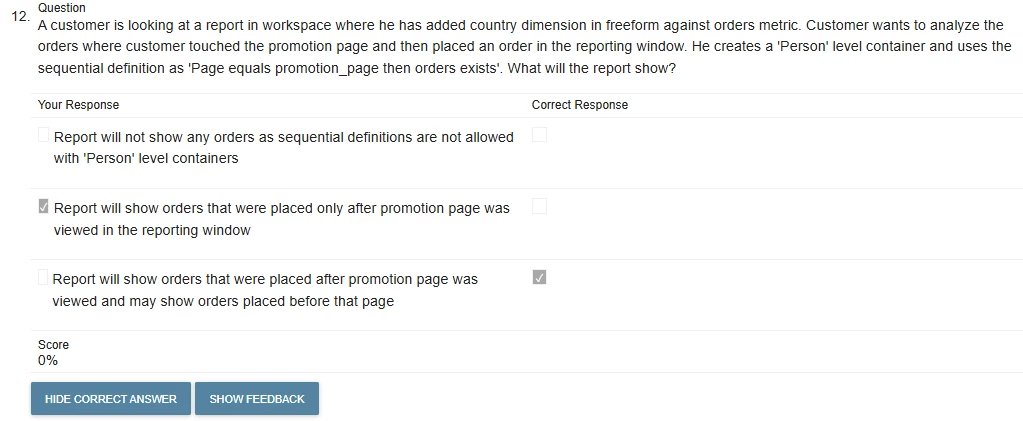
So, to tie this to the specific example in the question. If in the reporting window they saw the promotion page and then placed an order, it will return all of the events for that particular person/customer in the reporting window. If they placed an order before viewing the promotion page, and then placed another order after viewing it, as long as it is all in the reporting window, both orders would get returned.
I would recommend reviewing the documentation on how segments work. This link will take you directly to the part where it talks about include everyone or only before/after sequence, but it would be a good idea to review the whole page, especially if you’re prepping to write the certification.
Just to add context to this… I will just show some examples to help visualize what Mandy said:
Visit 1:
Home
Product Page
Order
Visit 2:
Home
FAQ
Visit 3:
Home
Promotion Page
Order
The segment:
Person
Page equals Promotion Page
THEN
Orders exists
Will match Visit 3, but will return all the data of this person from all three Visits...including the Order in Visit 1.
Note that the answer said may show orders from before, because the person may or may not have made an order before, or the order may be outside the date range of the report.