Solved
event fires but adobe report shows "zero" for that evennt
event fires correctly as expected but adobe report shows "zero" for that counter event. What could be the reason?. For the past 6 months it shows zero.
event fires correctly as expected but adobe report shows "zero" for that counter event. What could be the reason?. For the past 6 months it shows zero.
yes other events are populating value.
I notice in the above screenshot that you have
Events = "scAdd,event58,event59,event52"
and
Products = ";*;;;event58=*|event59=1|event52=1"
And you say that event58 and event59 are working... but not event52...
Can you confirm that event52 is configured as "Numeric" and not "Counter" in your admin? Event52 is clearly trying to send data using Numeric syntax, if its still set as a counter, Adobe may be ignoring it due to the mismatched implementation/config....
(Admin > Report Suites ---- choose suite ---- Edit Settings > Conversion > Success Events)
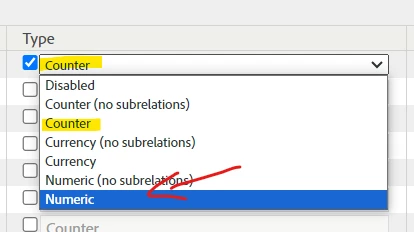
Since your original post called it a "counter event", but I can see that this needs to be a "numeric event" I want to be sure.
Enter your E-mail address. We'll send you an e-mail with instructions to reset your password.