Event Analysis for link click | Adobe Higher Education
Skip to main content
Level 4
January 11, 2024
解決済み

Event Analysis for link click

  • January 11, 2024
  • 1 の返信
  • 608 ビュー

Hi everyone,

I need to how can I create a report for particular link clicks .

On every link click , the link click event fires with the eVar(link clicked) .

For example, So, suppose If I want to get a  report for password change  link click. How should my report look like.

How to do event analysis in Workspace analysis report.
このトピックへの返信は締め切られました。
ベストアンサー Josh__Stephens

Hi @aepaa  -

To capture the number of times the eVar was sent, you'd use the eVar Instances for that particular eVar as the metric.  Breaking out by the eVar would show you the clicks for each link. 

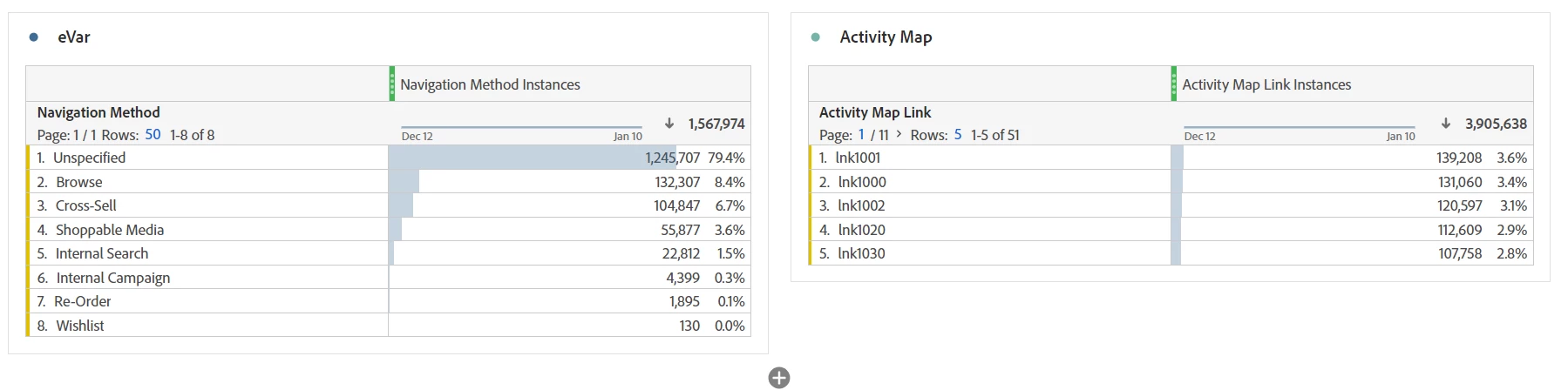
The table on the left is an example from sandbox demo data.  eVar 86 Navigation Method is the breakout dimension and Navigation Method Instances is the metric.  (If you use occurrences, you'd also get any values that persisted depending upon the eVar settings.)  


If you have activity map tracking, you can also use those dimensions & metrics as shown at right.  Here's more info on that.


1 の返信

Josh__Stephens
Community Advisor
Community Advisor
January 11, 2024

Hi @aepaa  -

To capture the number of times the eVar was sent, you'd use the eVar Instances for that particular eVar as the metric.  Breaking out by the eVar would show you the clicks for each link. 

The table on the left is an example from sandbox demo data.  eVar 86 Navigation Method is the breakout dimension and Navigation Method Instances is the metric.  (If you use occurrences, you'd also get any values that persisted depending upon the eVar settings.)  


If you have activity map tracking, you can also use those dimensions & metrics as shown at right.  Here's more info on that.


Jennifer_Dungan
Community Advisor and Adobe Champion
January 11, 2024

You can also create segments for specific links...


Something like:

HIT

    eVar(link clicked) equals password change


Then you can create a table using either a specific event for your clicks, or the default "Custom Link Instances", etc; and then break this down by Day, or Week, or Month, etc... so you can see a trend of "password change" links specifically