
marion33678522
Level 5
August 31, 2018
Solved

Evar Duplicate value on Prop Error

Hello Adobe Community,

We just noticed that since july (well yes a little bit late, but holydays and all that...) one of our evars was capturing a wrong value in Adobe Analytics as : "d=c22"

Omnibug logs show the same, but If I recall alright, this was something normal in this type of tools, and the "d" stands for Dynamic.

The config shows this in the DTM , there should not be any problem - spetially since the prop22 has not any problems and the Data of this one is alright.
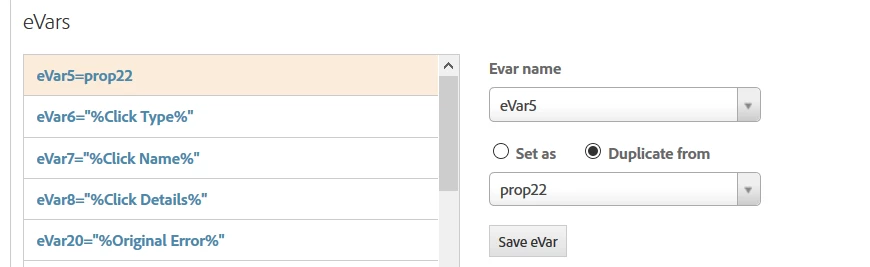
Has anybody had had this problem too ?

I cannot  find what is causing this, and why it started in mid july !

Please some help on this !

Cheers !

M.

This post is no longer active and is closed to new replies. Need help? Start a new post to ask your question.
Gigazelle
GigazelleAccepted solution
Adobe Employee
September 14, 2018

Dynamic variables are best used to help keep image request lengths down.

If you're getting the literal value 'd=c22' in reporting and you didn't make any changes to the dynamic variable in DTM, creating a ticket with customer care is going to be your best bet.

Be sure to check to dynamic variable designator in DTM, because there's a solid chance that's what is causing the issue.

2 replies

marion33678522
Level 5
August 31, 2018

Shoul I change this config and just put the same that on prop 22? The config of prop22 is  as it follows : prop 22 =  %Datalelement% .

What is the difference between this 2 configs ? I mean : between using the interface to "Duplicate from"; or just use the Datalement ?

Is it to go faster ? but It's not like if it was to hard to type the name of the datalement.

Cheers !

Translate
Gigazelle
Adobe Employee
GigazelleAdobe EmployeeAccepted solution
Adobe Employee
September 14, 2018

Dynamic variables are best used to help keep image request lengths down.

If you're getting the literal value 'd=c22' in reporting and you didn't make any changes to the dynamic variable in DTM, creating a ticket with customer care is going to be your best bet.

Be sure to check to dynamic variable designator in DTM, because there's a solid chance that's what is causing the issue.

Translate