Error: 8000 in Adobe Analytics Report Builder | Community
Skip to main content
March 19, 2025
Solved

Error: 8000 in Adobe Analytics Report Builder

  • March 19, 2025
  • 3 replies
  • 752 views

Hello!


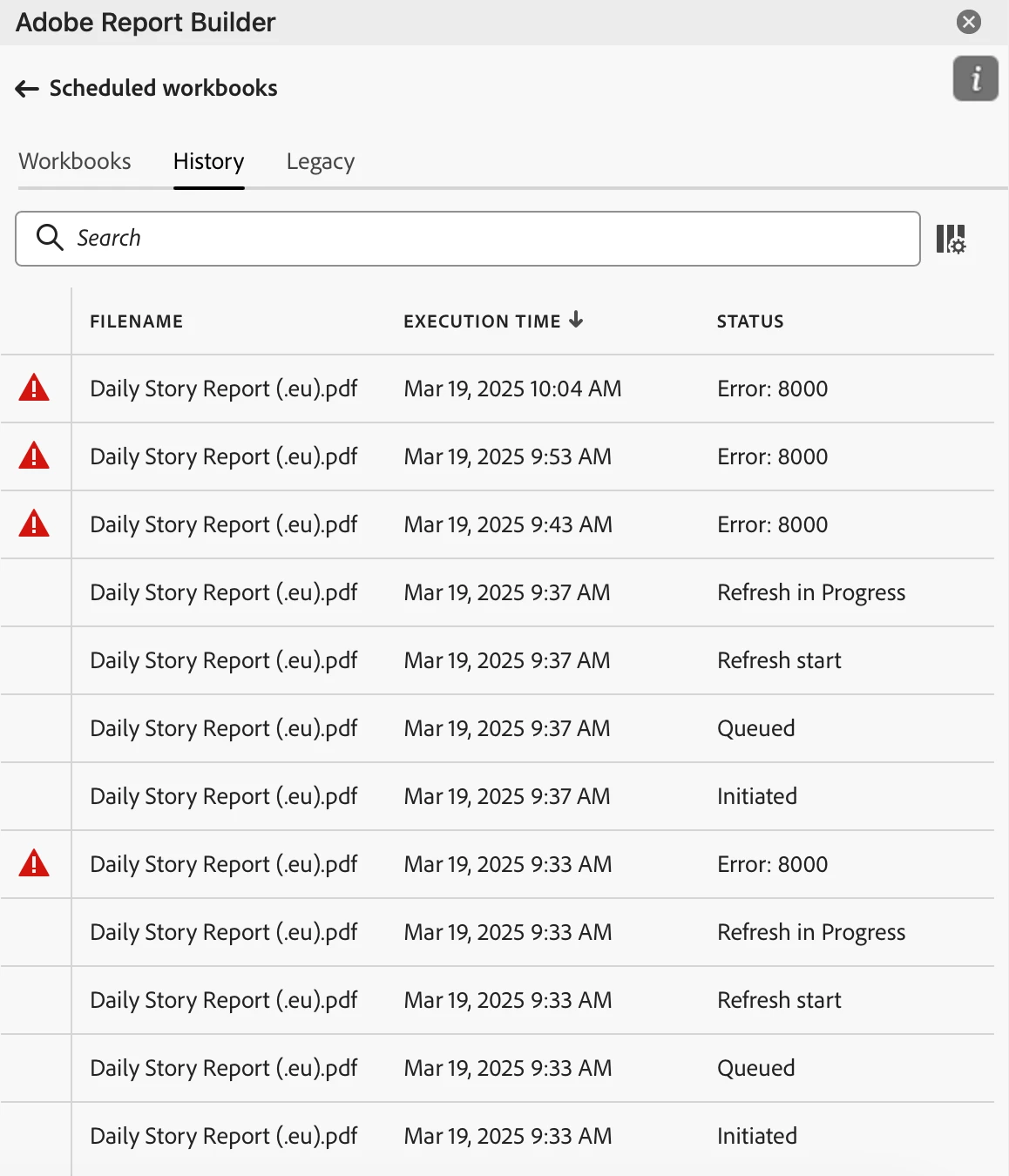
I'm using the Report Builder extension in Excel for Adobe Analytics. I was able to create a data block with default and custom metrics and I'm also able refresh the data. Once I tried scheduling the report as a pdf or xlsx, I'm facing Error: 8000 right after the automatic refresh starts (see screenshot below). I've tried several times with different queries and it's still the same error message.


I'm hearing that this procedure works fine on Windows devices. Where can I find the reference for error messages and why am I experiencing the error?


I'm using Excel Version 16.95 on Mac OS Sequoia.


Any guidance is appreciated!


Best answer by Deepika_S_V

Hi @ilya_pozdnyakov 


It looks like you're encountering Error: 8000 when scheduling a report in Adobe Report Builder on Mac OS Sequoia. While Adobe does not provide detailed documentation on this specific error, I'm not sure of the exact cause, but you can try these steps:


1. Manual Export – If scheduling fails, try manually refreshing the Report Builder query and then exporting it manually as a PDF or XLSX.

2. Windows Workaround – Use a Windows system (if possible) to schedule reports instead. 


Thanks!

3 replies

atharva32
Level 2
March 19, 2025

Hi @ilya_pozdnyakov , I am assuming it could be either, file size is more than 5 MB or the maximum scheduled workbook count has reached per report builder license. Attaching the link for reference. 

Not really sure though.


https://experienceleague.adobe.com/en/docs/analytics/analyze/legacy-report-builder/t-schedule-a-data-request


Thanks!

Deepika_S_VAccepted solution
Level 2
March 20, 2025

Hi @ilya_pozdnyakov 


It looks like you're encountering Error: 8000 when scheduling a report in Adobe Report Builder on Mac OS Sequoia. While Adobe does not provide detailed documentation on this specific error, I'm not sure of the exact cause, but you can try these steps:


1. Manual Export – If scheduling fails, try manually refreshing the Report Builder query and then exporting it manually as a PDF or XLSX.

2. Windows Workaround – Use a Windows system (if possible) to schedule reports instead. 


Thanks!

Sukrity_Wadhwa
Community Manager
Community Manager
April 2, 2025

Hi @ilya_pozdnyakov,

Were you able to resolve this query with the help of the provided solutions, or do you still need further assistance? Please let us know. If any of the answers were helpful in moving you closer to a resolution, even partially, we encourage you to mark the one that helped the most as the 'Correct Reply.'
Thank you!

Sukrity Wadhwa