"Equals any of" in advanced table filter | Adobe Higher Education
Skip to main content
New Member
November 11, 2022
Besvarat

"Equals any of" in advanced table filter

  • November 11, 2022
  • 2 svar
  • 1241 visningar

Hi there, 


I'm trying to filter a table based on a selection of different product numbers. I tried creating a segment using the 'equals any of operator', but the table returns additional products because there is often more than 1 product on a single analytics call. 


Instead, I'm trying to filter the table manually using the advanced filter, but there is no 'equals any of' operator. 

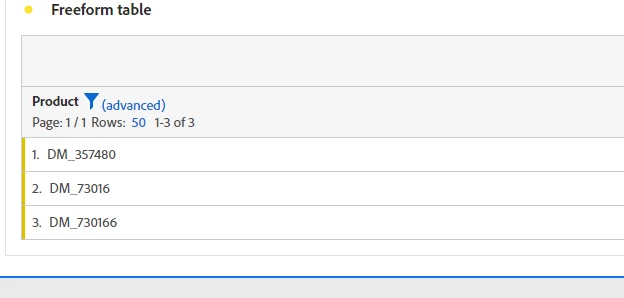
When I use this search filter, it will also return products that contain that number: eg: if I filtered for DM_73016, it also brings DM_730166 too for example.
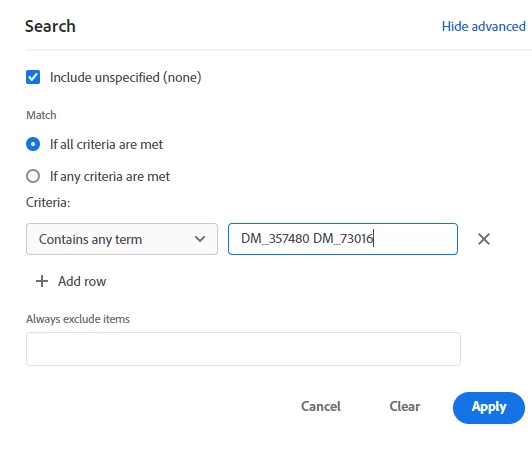


Are there any ways around this? I need to filter by 300 different product keys, so manually adding each isn't an option


Thank you! 

Sonia

Det här ämnet har stängts för svar.
Bästa svar av Jennifer_Dungan

Unfortunately, Products is a real pain to work with.. you are correct that with multiple products on a single call, more than what you are looking for will be returned with the segment.


Also, it's not a hash collision.. since you are using "contains any term" and "DM_73016" is clearly part of "DM_730166"...I've experienced hash collisions in our own data, and it's definitely not fun.


If you were trying to return a smaller set of data, you could have added an extra "doesn't contain clause", but this just isn't realistic in your scenario.


Sadly, I think your only option is to get the data external to Adobe (either using Data Warehouse or Report Builder) and use Excel to parse the data and return only the values you want.

2 svar

VaniBhemarasetty
Adobe Employee
Adobe Employee
November 11, 2022

@sonialu1 Does Product dimension that you are using is having more 500,000 unique values in a month ? If that is the case, there is a high possibility of hash collision that can happen


You can read about more here

https://experienceleague.adobe.com/docs/analytics/implementation/validate/hash-collisions.html?lang=en


Jennifer_Dungan
Community Advisor and Adobe Champion
November 11, 2022

Unfortunately, Products is a real pain to work with.. you are correct that with multiple products on a single call, more than what you are looking for will be returned with the segment.


Also, it's not a hash collision.. since you are using "contains any term" and "DM_73016" is clearly part of "DM_730166"...I've experienced hash collisions in our own data, and it's definitely not fun.


If you were trying to return a smaller set of data, you could have added an extra "doesn't contain clause", but this just isn't realistic in your scenario.


Sadly, I think your only option is to get the data external to Adobe (either using Data Warehouse or Report Builder) and use Excel to parse the data and return only the values you want.