
Enhancement: Display the success event ID, conversion variable ID, or Property Value ID within workspace breakdowns | Community
Skip to main content
dillonb16317612
Level 2
October 14, 2020
Solved

Enhancement: Display the success event ID, conversion variable ID, or Property Value ID within workspace breakdowns

  • October 14, 2020
  • 1 reply
  • 1135 views

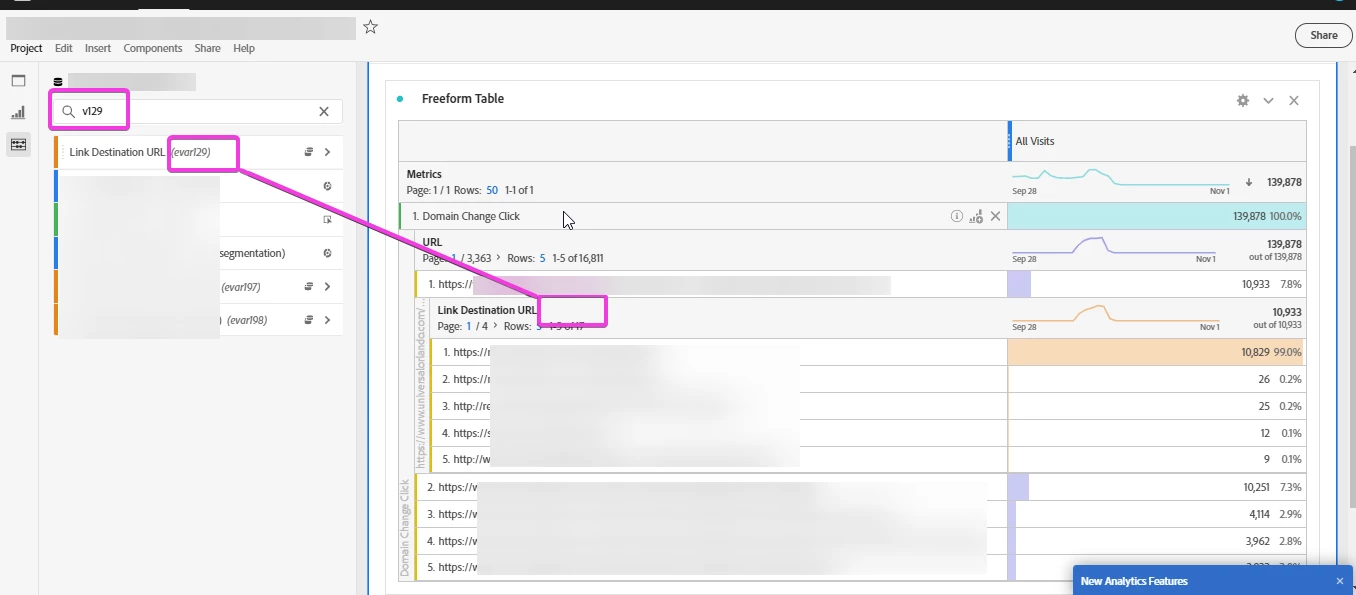
In Adobe Analytics Workspace area, the left pane can search these values such as "v129" and shows the hint in parenthesis, but when I view within the breakdown on the right, this hint is not visible.


Please display it there as well so we do not have to enter into each Description within Admin as a workaround, this makes viewing workspace reports a little convoluted. Perhaps even a toggle option to display these or not. 
This post is no longer active and is closed to new replies. Need help? Start a new post to ask your question.
Best answer by Brian_Johnson_

@dillonb16317612 - This has long been a challenge in Adobe Analytics, so I hope you get some traction with this request!

One suggestion I'll throw out (and others will likely offer similar thoughts) is to include the variable identifier as part of the name. Most implementations I work with use schemas similar to the following: [variableName] - [id] 

For example, name your eVar "Link Destination URL - v129". If it were a prop, name it "Link Destination URL - c1" (or "p1" depending on your preference).

I recognize it's not ideal, but this makes sure you always have the identifier.

1 reply

Brian_Johnson_
Brian_Johnson_Accepted solution
Level 8
October 14, 2020

@dillonb16317612 - This has long been a challenge in Adobe Analytics, so I hope you get some traction with this request!

One suggestion I'll throw out (and others will likely offer similar thoughts) is to include the variable identifier as part of the name. Most implementations I work with use schemas similar to the following: [variableName] - [id] 

For example, name your eVar "Link Destination URL - v129". If it were a prop, name it "Link Destination URL - c1" (or "p1" depending on your preference).

I recognize it's not ideal, but this makes sure you always have the identifier.

Level 3
November 4, 2020
This is exactly what we have done for the past 14 years... works pretty well.