Download full free form table to csv | Community
Skip to main content
June 21, 2022
Solved

Download full free form table to csv

  • June 21, 2022
  • 1 reply
  • 2017 views

Hi there,

How the hell can I download a full free form table to CSV? Not the displayed rows, but the whole table? And I don't want to expand each dimension one by one to show all rows cause I have many of them. None of the available options work. How is it possible that such a simple feature is not available? 

Thanks and best regards.

This post is no longer active and is closed to new replies. Need help? Start a new post to ask your question.
Best answer by jeff_bloomer

Hi Victor,

When you view the table, simply do the following:

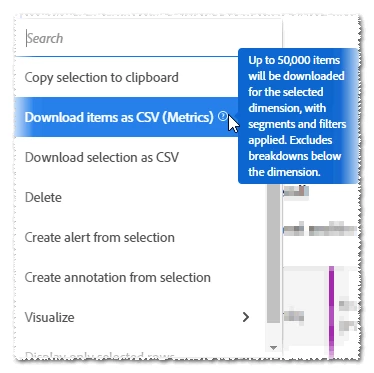
  1. Right-click and then, select Download items as CSV:

1 reply

jeff_bloomer
Community Advisor and Adobe Champion
jeff_bloomerCommunity Advisor and Adobe ChampionAccepted solution
Community Advisor and Adobe Champion
June 21, 2022

Hi Victor,

When you view the table, simply do the following:

  1. Right-click and then, select Download items as CSV:
jeff_bloomer
Community Advisor and Adobe Champion
June 21, 2022

@victor_marti - I just re-read your post, and realized you actually WANTED all of the broken out values.  😆
That's a horse of a different color.

Let me rephrase:
The option I provided above will work for everything that's already been broken out.  The beauty of it is you will NOT have to take the time to display additional rows of items.  For instance, if it's currently displaying rows 1 thru 5 and there are 1000, you will not have to display all 1000 for it to download all 1000 rows.  Just remember, you will be limited to a TOTAL of 50,000 items for the entire freeform table.  Beyond that, you'll have to perform a database output.  🙄

June 21, 2022

Thank you @jeff_bloomer for your quick answer. The issue is that I have a short table, not many rows. However, it only downloads the displayed rows of each breakdown. 1 to 5, and skip the rest. Why?