DMA Data feed bug for Chinese, Japanese and Korean alphabet | Community
Skip to main content
Level 2
January 22, 2025
Solved

DMA Data feed bug for Chinese, Japanese and Korean alphabet

  • January 22, 2025
  • 2 replies
  • 930 views

In the daily DMA data feed export the Chinese, Japanese and Korean alphabet are not well represented. Example:

HIT_KEYFILE_NAMEPAGE_URLREFERRERFILE_DOWNLOAD_URL
368993787063137075246182360669450081081718261218   training-STM32GA/7- 基于STM32G4电机控制å

Although those alphabets are well tracked in Adobe Analytics and in Adobe workspace the values are correct:
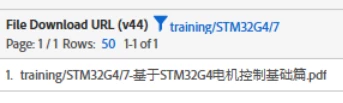
Could you please help me to fix it?

Thanks


This post is no longer active and is closed to new replies. Need help? Start a new post to ask your question.
Best answer by Harveer_SinghGi1

If this is an intermittent issue that affects similar values and these values always show correctly in other tools then I'd consider it more of MS Excel issue than AA data feeds. If other tools (like text editors) are showing the correct format then I'll probably not worry much about how excel displays it as the actual data is in correct format and I have other means of working with this data like SQL, Python etc.

Cheers!

2 replies

Harveer_SinghGi1
Community Advisor
Community Advisor
January 22, 2025

Hi @claudioma2 ,

Can you confirm which tool you are using the view the data feed content? These kind of issues are normally seen when you try to open a file with multi byte characters in MS Excel.

Do you face the same issue when you open the feed file in a text editor like notepad or notepad++?

Cheers!

Level 2
January 22, 2025

I'm using Excel, but in other cases, this problem hadn't occurred. On Adobe, it displays correctly. Thank you for the response!

Harveer_SinghGi1
Community Advisor
Harveer_SinghGi1Community AdvisorAccepted solution
Community Advisor
January 22, 2025

If this is an intermittent issue that affects similar values and these values always show correctly in other tools then I'd consider it more of MS Excel issue than AA data feeds. If other tools (like text editors) are showing the correct format then I'll probably not worry much about how excel displays it as the actual data is in correct format and I have other means of working with this data like SQL, Python etc.

Cheers!

Jennifer_Dungan
Community Advisor and Adobe Champion
January 22, 2025

If you are using Excel, have you tried using Data Import from Text/CSV, and choosing a different encoding standard?


Or if you are importing the data feeds directly into a database, you may need to adjust the ingestion rules to support a different encoding.

Level 2
January 22, 2025

Yes, I did it, in fact this problem doesn't always occur with all files or in all cases, but only for this case.


Thank you for the answer

Jennifer_Dungan
Community Advisor and Adobe Champion
January 22, 2025

So even choosing a different encoding, this value was still messed up? That's interesting..