Distinguishing between first and last touch marketing channel classifications | Community
Skip to main content
Level 4
March 2, 2018
Solved

Distinguishing between first and last touch marketing channel classifications

  • March 2, 2018
  • 6 replies
  • 3935 views

We have spent a lot of time setting up intuitive marketing channel classifications for our marketing team, but we are still running into one major problem. Because the classification columns for first touch and last touch are forced to match, we are unable to discern whether a report is a first touch or a last touch report. Or if there is a mix of first and last touch in the same report, it seems impossible to distinguish between the two. Is there any way to give different names to the first touch and last touch classification columns so that they aren't confused with each other when reporting? I'll attach screenshots of the problem below.

When searching, we are able to distinguish between the two with the grayed out text to the right.
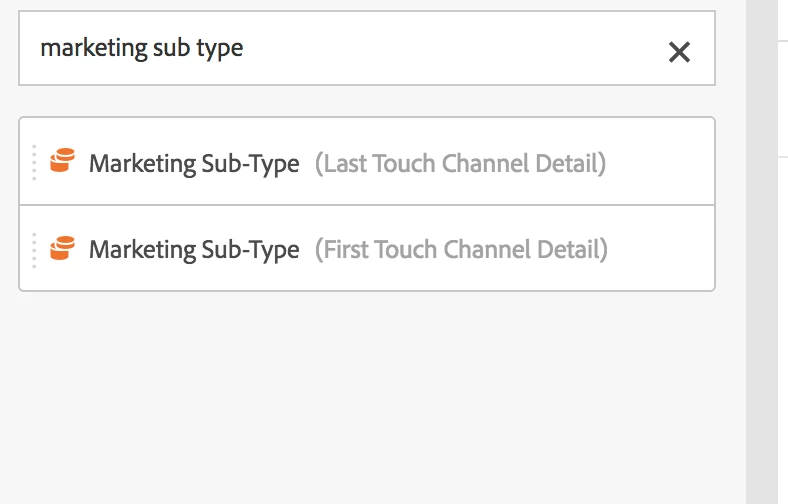
But once these have been dragged into a report, the grayed out text is removed, and this is what we see.
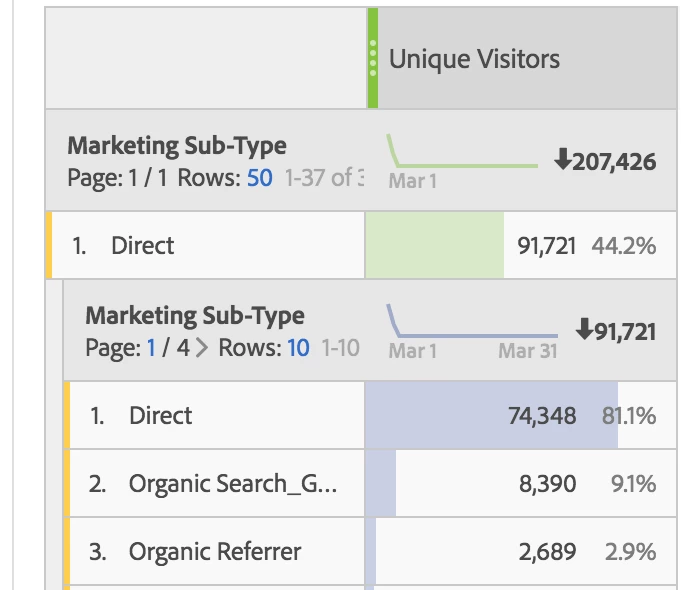
So then the question is... is this first touch "sub-type" being broken down by last touch "sub-type" or the other way around? It doesn't seem like there is any way to know once the dimension has been dragged into the report.

Any help would be appreciated.

Thanks!

This post is no longer active and is closed to new replies. Need help? Start a new post to ask your question.
Best answer by Andrew_Wathen_

I'm pretty sure there is no way to distinguish between the two.  Looking back through the forum there was an idea that was logged back in the year 2012 which was related to this but I don't think Adobe have taken any action yet:

Allow for separate SAINT Classifications for Marketing Channels report

6 replies

jayakrishnaap53
Level 3
March 5, 2018

Hello,

Please refer the below articles from adobe and it would be helpful for you to understand the reporting and attributed for Marketing channel.

Marketing Cloud Help

Compare Marketing Channels First and Last Touch

Thank you,

jay.

nickhomerAuthor
Level 4
March 6, 2018

Hello Jay,

Thank you for taking time to answer, but your answer does not help at all. I fully understand the difference between first touch and last touch marketing reports. The problem is that once a marketing channel classification report has been dragged into a table, you can no longer see if it is the first touch or last touch version of the classification.

Andrew_Wathen_
Community Advisor
Andrew_Wathen_Community AdvisorAccepted solution
Community Advisor
March 6, 2018

I'm pretty sure there is no way to distinguish between the two.  Looking back through the forum there was an idea that was logged back in the year 2012 which was related to this but I don't think Adobe have taken any action yet:

Allow for separate SAINT Classifications for Marketing Channels report

Adobe Employee
March 14, 2018

You can distinguish between dimensions that are named the same by hovering over the dimension header in the table. An 'i' icon will appear that has the full dimension information. We added this sometime last year based on similar customer feedback. Hope that helps!

nickhomerAuthor
Level 4
March 14, 2018

Hi Jen, I guess that helps much of the time, but only if you've dragged the entire dimension over onto the freeform table. If you drag only specific values from the dimension into the freeform table, then the 'i' icon does not appear (as shown in the original screenshot above).

Also, having the 'i' is great, but when so many reports get passed around as screenshots or in powerpoints, the ability to mouse over the 'i' isn't available in those situations.

Adobe Employee
March 15, 2018

Great point on dimension item rows missing the "i" icon. Will look into if that's something we can add, for completeness!