New
Dimension Icons for Expiration and Allocation
When i see the list of Dimension, i would wish there where a easy way to see if a Dimension is Hit or Visit based. And what Allocation is used.
Today we have to include this in the Description and/or in the actual naming.
For certain dimensions it make big difference if a user chose the Hit based, or the Visit based.
For those dimensions, where we have both we include it in the name.
But i would prefer if this was show with a icon, or other visual indicator
My quick mock examples below.
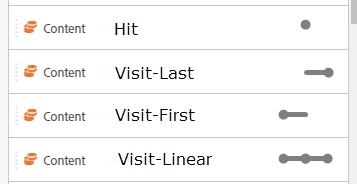
For other expiration than Hit and Visit, a other solution can be used.
I'm, sure Adobes skilled UX'er have ideas.