Default tab when entering Adobe Analytics | Community
Skip to main content
March 12, 2022
Solved

Default tab when entering Adobe Analytics

  • March 12, 2022
  • 1 reply
  • 874 views

How do I make my Workspace tab the default when I launch Adobe Analytics, instead of the Reports tab? Is there a settings function where i can set the default view?


This post is no longer active and is closed to new replies. Need help? Start a new post to ask your question.
Best answer by loveesh851

Hi @vq862m 

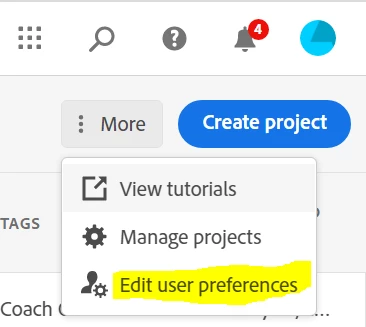
Check if you are on the latest version of analytics as now a days analytics tool will automatically show you the "Workspace" tab by default. However still in case you don't see it then click on the click on  ":More" >> edit user preferences  and under "General Tab" choose the project option than you want to set as a landing page.

For more details please use the link below:

https://experienceleague.adobe.com/docs/analytics-learn/tutorials/intro-to-analytics/customizing-the-ui/setting-an-analysis-workspace-project-as-your-landing-page.html?lang=en


1 reply

loveesh851Adobe EmployeeAccepted solution
Adobe Employee
March 13, 2022

Hi @vq862m 

Check if you are on the latest version of analytics as now a days analytics tool will automatically show you the "Workspace" tab by default. However still in case you don't see it then click on the click on  ":More" >> edit user preferences  and under "General Tab" choose the project option than you want to set as a landing page.

For more details please use the link below:

https://experienceleague.adobe.com/docs/analytics-learn/tutorials/intro-to-analytics/customizing-the-ui/setting-an-analysis-workspace-project-as-your-landing-page.html?lang=en


vq862mAuthor
March 14, 2022

Yes, that answered my question.  I guess I'm on older version, but the directions were spot on.  Thank you so much!!


Adobe Employee
March 15, 2022

Hi @vq862m 

Thank you so much for your comments. Can you please accept my previous reply as "Accepted Solution" so that I can mark this question as answered.