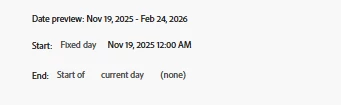
I am trying to figure out if I can make a segment that takes a time range calculated based on how many days have passed from a specific time.
For example, if we have a new design/new campaign I can make a date range to start from the campaign start date to today, but if I want to compare the period before with the same amount of days is there a way to do it?
In this case the Before segment today will be these dates Aug 13, 2025 - Nov 18, 2025. But tomorrow I need it to be Aug 12, 2025 - Nov 18, 2025, as the other segment will now include Nov 19, 2025 - Feb 25, 2026.
This post is no longer active and is closed to new replies. Need help? Start a new post to ask your question.
Best answer by Jennifer_Dungan
Unfortunately no… there is no “rolling negative” Date Range.. this is something that has been asked for, and something the champ group has been asking for improved date comparisons.
Update (I accidentally hit something that posted before I was done):
There is currently no way to get the “number of days from Fixed Date until Today” to use in the Date Range “minus days” (this will only take set values, not dynamic values at this time)
FYI, You are looking at “Date Ranges” not “Segments”, so I can understand why @DanIMS1 showed you a Segment declaration… but even still, that was only a “Forward Looking” segment, not a “Backwards Looking” segment.
So yes, you can create a segment that looks at specific dates, but there are multiple problems with this…
This doesn’t hide the days outside of the specified range (those days will just not count), which is fine if you are looking at a different dimension breakdown, but not a good side by side date comparison)
It’s still not dynamic… there is no calculation of “Days since Fixed Day” to apply as a backwards lookback from that Fixed Date.
The only way to truly do this, is to use Report Builder and Excel Date Formulas/Math.
You will get your data straight from Adobe with Report Builder, but the display of the data, and the date ranges will use Excel.
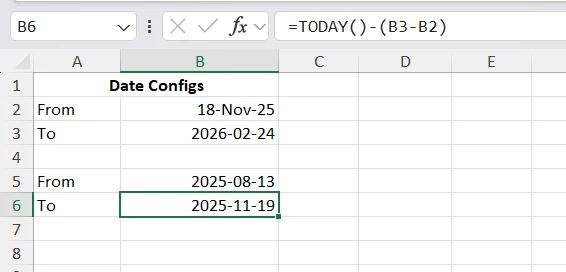
Basically, you would choose your Fixed Day and put that date in a cell for your first “From” date (cell B2)… then you would do a second cell that looks at “=Today()-1” (cell B3) (I assume you don’t want today’s data as it’s incomplete).
Next, you need to calculate your “previous” date range, I think these formulas should work:
From: =TODAY()-(B3-B2)*2 To: =TODAY()-(B3-B2)
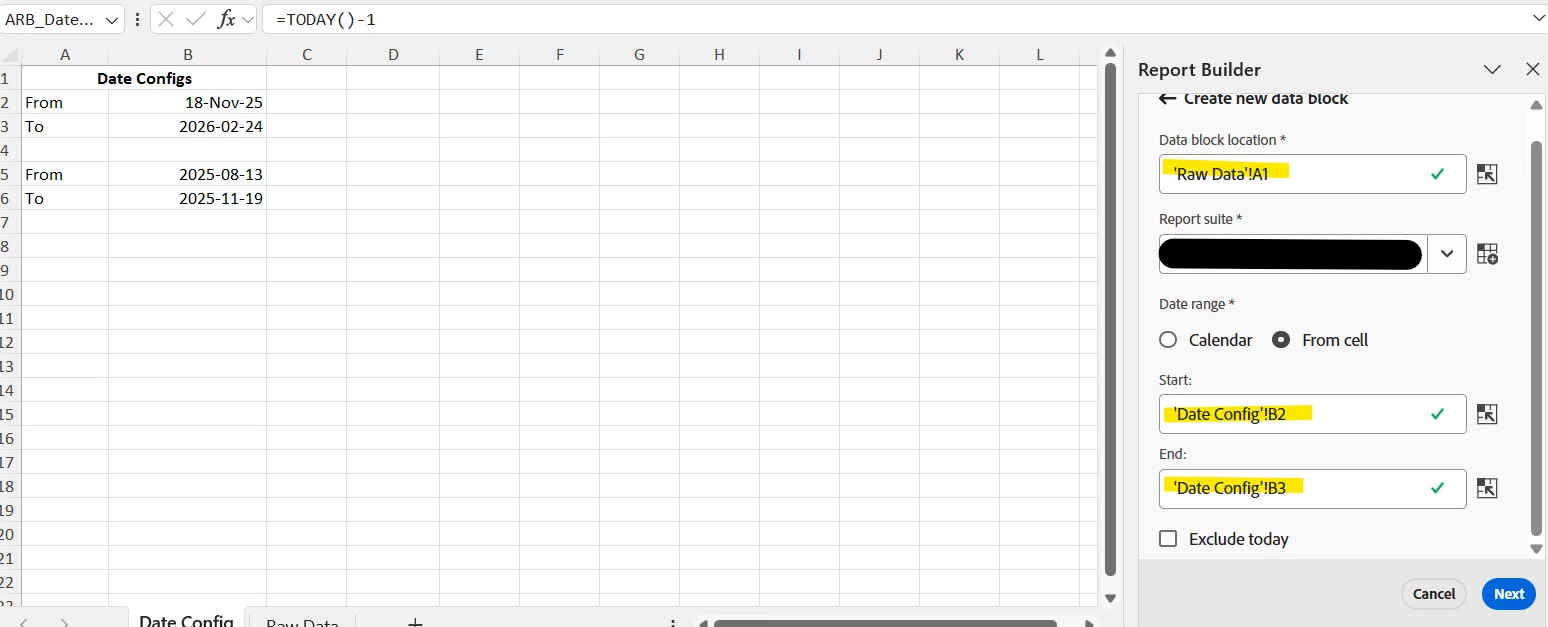
Now, when you use Report Builder, you make one request using cells B2 to B3, and one request using cells B5 to B6
It is possible, but it’s a bit tricky and a bit hacky; it will probably do the job.
If you create the segment using the “day of year” dimension, you can then use the greater than operator to set the last day of the pre-event time frame. Combine this with the “year” dimension, setting the value to the year you want to use, and this should create what you need. Unfortunately, the year dimension isn’t a number like the day one, so you can’t just use greater than with that and have to specify the years you want it active for, so if you want it to span multiple years, then you need to be more specific with the setup and use containers, but the logic is the same.
Here is a simple example of how it would look:
Here is an example of the data in a table, I have cropped out the actual values, but you can see the blue background kicks in on the 16th:
Unfortunately no… there is no “rolling negative” Date Range.. this is something that has been asked for, and something the champ group has been asking for improved date comparisons.
Update (I accidentally hit something that posted before I was done):
There is currently no way to get the “number of days from Fixed Date until Today” to use in the Date Range “minus days” (this will only take set values, not dynamic values at this time)
FYI, You are looking at “Date Ranges” not “Segments”, so I can understand why @DanIMS1 showed you a Segment declaration… but even still, that was only a “Forward Looking” segment, not a “Backwards Looking” segment.
So yes, you can create a segment that looks at specific dates, but there are multiple problems with this…
This doesn’t hide the days outside of the specified range (those days will just not count), which is fine if you are looking at a different dimension breakdown, but not a good side by side date comparison)
It’s still not dynamic… there is no calculation of “Days since Fixed Day” to apply as a backwards lookback from that Fixed Date.
The only way to truly do this, is to use Report Builder and Excel Date Formulas/Math.
You will get your data straight from Adobe with Report Builder, but the display of the data, and the date ranges will use Excel.
Basically, you would choose your Fixed Day and put that date in a cell for your first “From” date (cell B2)… then you would do a second cell that looks at “=Today()-1” (cell B3) (I assume you don’t want today’s data as it’s incomplete).
Next, you need to calculate your “previous” date range, I think these formulas should work:
From: =TODAY()-(B3-B2)*2 To: =TODAY()-(B3-B2)
Now, when you use Report Builder, you make one request using cells B2 to B3, and one request using cells B5 to B6