Data source is failing | Community
Skip to main content
rohinid2700173
October 20, 2019
Solved

Data source is failing

  • October 20, 2019
  • 2 replies
  • 1807 views

Hi,

I am trying to upload the data from data sources in adobe but it has been failing every time. Can anyone here help me to figure out what i am missing.

I have created a data source where i am trying to upload the net sales for the transaction ids. In this, i have netsales event and order id as the data dimension.

Below is screenshot of the sample data i am trying to upload.
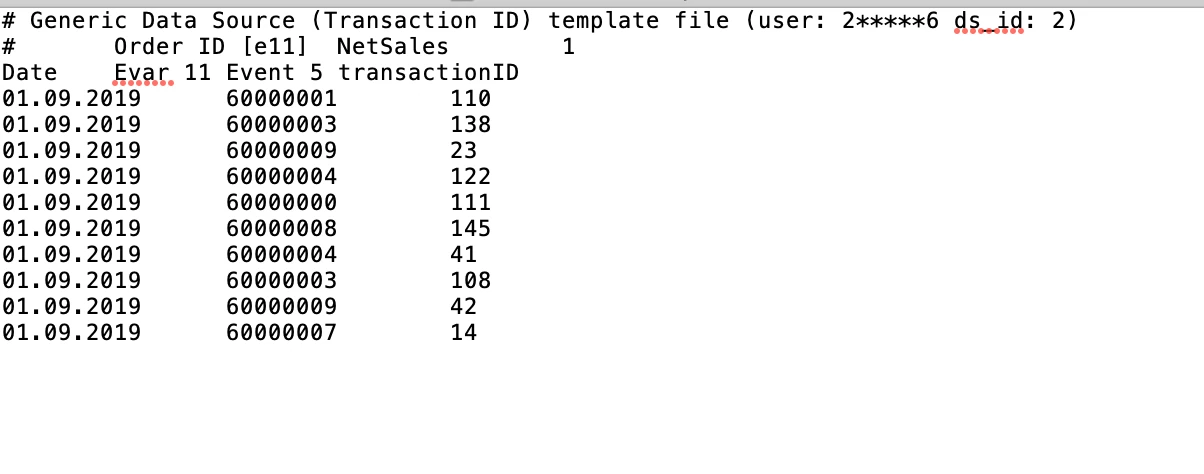
I don't know where to find the reason of failure. But i can only see status as failure.

Thanks in advance!

This post is no longer active and is closed to new replies. Need help? Start a new post to ask your question.
Best answer by Andrey_Osadchuk

I can see two causes of why the file is failing to get processed:

  • the date format is incorrect (check the documentation for the compatible format)
  • there are four columns listed in the header while the data is only for 3 of them

2 replies

Andrey_Osadchuk
Andrey_OsadchukAccepted solution
Level 10
October 21, 2019

I can see two causes of why the file is failing to get processed:

  • the date format is incorrect (check the documentation for the compatible format)
  • there are four columns listed in the header while the data is only for 3 of them
rohinid2700173
October 21, 2019

Thanks Andrey.

Because of your answer, I realised that i was using the wrong option. Since i need to import the right sales numbers for the transaction so i should have used the "Generic Data Source (Full Processing Processing)" option instead of transaction ID. Now i have got the right data source format as below:

It is working now.

Thanks