Data Feed - Mobile Device Type data not showing (updated) | Community
Skip to main content
williama4146439
March 20, 2019
Solved

Data Feed - Mobile Device Type data not showing (updated)

  • March 20, 2019
  • 3 replies
  • 4830 views

We have a data feed that includes the MOBILEDEVICE field however, when we extract the data to our S3 bucket it only contains NULLs.   We can see from the Workspace that we are getting data:
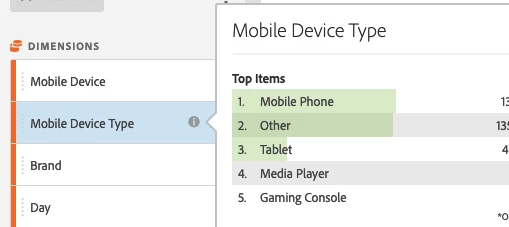
But we do not see any data coming from the data feed.

Any pointers on where this data sits in the data feed?

Just found information in USER_AGENT field.   Next question is how do I attain the groupings above (Mobile Phone, Other, Tablet....)?

This post is no longer active and is closed to new replies. Need help? Start a new post to ask your question.
Best answer by Asheesh_Pandey

Hi,

In place of relying on USER_AGENT sent by browser I would custom set platform and device type ("desktop", "mweb", "ios", "android" etc.) value in a custom propX and than look for post_propX in data feed. If you want to go a hard way to find it... Following links can help you find a way out.

https://developer.mozilla.org/en-US/docs/Web/HTTP/Browser_detection_using_the_user_agent

https://developer.mozilla.org/en-US/docs/Web/HTTP/Headers/User-Agent/Firefox

User Agent Strings - Google Chrome

Thanks,

Asheesh

3 replies

Asheesh_Pandey
Community Advisor
Asheesh_PandeyCommunity AdvisorAccepted solution
Community Advisor
March 31, 2019

Hi,

In place of relying on USER_AGENT sent by browser I would custom set platform and device type ("desktop", "mweb", "ios", "android" etc.) value in a custom propX and than look for post_propX in data feed. If you want to go a hard way to find it... Following links can help you find a way out.

https://developer.mozilla.org/en-US/docs/Web/HTTP/Browser_detection_using_the_user_agent

https://developer.mozilla.org/en-US/docs/Web/HTTP/Headers/User-Agent/Firefox

User Agent Strings - Google Chrome

Thanks,

Asheesh

- Asheesh
Level 2
June 25, 2019

Hi there,

I'm not sure you found an answer, so here is mine: mobiledevice column will stay undefined unless you match it with mobile_id column, with a specific lookup table (can't remember the name). It works like browser.tsv lookup table, except you have to ask Adobe Customer Care to get the file.

You should ask to get the file periodically since new devices appear regularly, with a new mobile_id to match with its name. Usually you get a new file every month.

mobile_id

Nicolas

PratheepArunRaj
Community Advisor and Adobe Champion
June 29, 2019

Dear William,

Did any of the above method work for you? If yes, please mark the answer correct to close the thread.

Thank You!

Arun

Thank You, Pratheep Arun Raj B (Arun) | Xerago | Terryn Winter Analytics