Data Extract Option in Reports | Community
Skip to main content
August 23, 2018
Solved

Data Extract Option in Reports

  • August 23, 2018
  • 1 reply
  • 822 views

Hi, I can only download 400 rows of data at a time when I create a report in Workspace. It seems there is an option called data extract that allows you to download any number of rows of data. I don't see this option using my current access level. Can someone help me on what user access do I need to have to be able to use this feature?

This post is no longer active and is closed to new replies. Need help? Start a new post to ask your question.
Best answer by PratheepArunRaj

Dear Netelix,

In Analysis Workspace you can only extract 400 rows of data at a time.

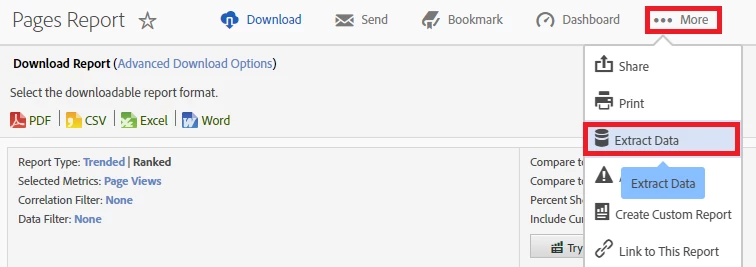
We do have Data Extract option, not in Workspace but in Analytics Interface : Below the screen grab from Pages Report:

Thank You!

Arun

1 reply

PratheepArunRaj
Community Advisor and Adobe Champion
PratheepArunRajCommunity Advisor and Adobe ChampionAccepted solution
Community Advisor and Adobe Champion
August 23, 2018

Dear Netelix,

In Analysis Workspace you can only extract 400 rows of data at a time.

We do have Data Extract option, not in Workspace but in Analytics Interface : Below the screen grab from Pages Report:

Thank You!

Arun

Thank You, Pratheep Arun Raj B (Arun) | Xerago | Terryn Winter Analytics