Create Segment for visits over 100 | Community
Skip to main content
Level 7
April 18, 2018
Solved

Create Segment for visits over 100

  • April 18, 2018
  • 12 replies
  • 6562 views

Hello Seniors,

May I know how to create segment for "total visits" over like 100 times?

I tried use "visits" or "visit number" in Hits/Visits/Visitors, none is correct.

As you can see, following screen shows "Visits" lower than 100 as well.
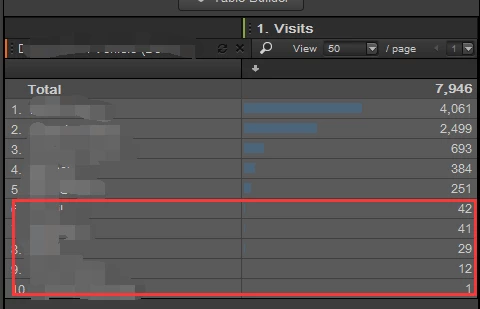
Please help to suggest.

Thank you.

H

This post is no longer active and is closed to new replies. Need help? Start a new post to ask your question.
Best answer by Gigazelle

Took me a while to figure out that you're talking about total number of visits, and had absolutely nothing to do with how frequently a user visits.

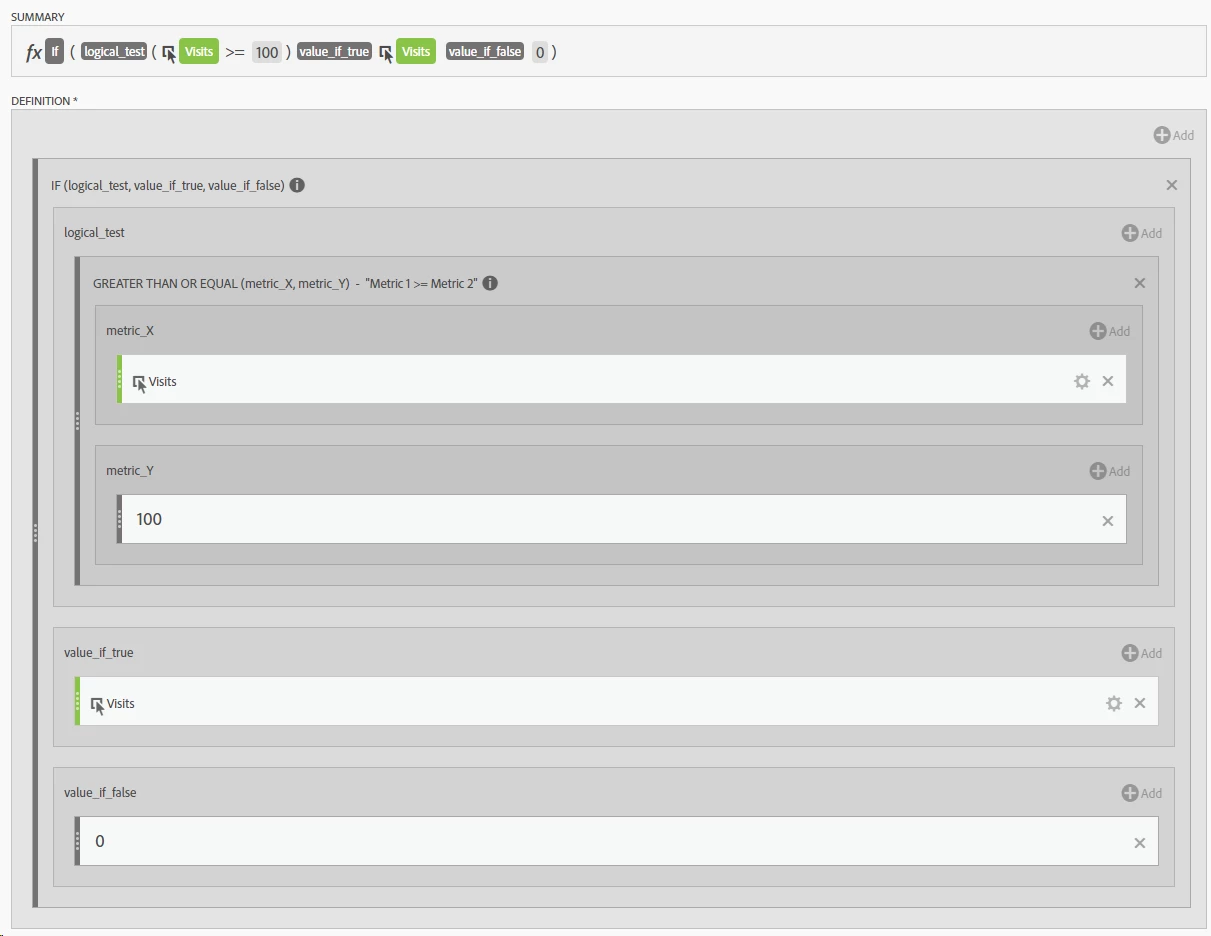
This calculated metric will get you exactly what you're looking for.

12 replies

Level 2
April 18, 2018

Hello,

Instead of segmentation,calculated metrics should be used for this scenario.

Create a calculated metrics as below:

H_LAuthor
Level 7
April 27, 2018

Edison,

Thank you for your reply, I will try it soon.

But I still cannot understand, why it doesn't work to use "segment" set the criteria to: visit > 100.

Hopefully there was someone could help to clarify the reason.

I will get back and let you know if it does work of your recommendation.

H

Level 2
April 27, 2018

Hello,

visits number > 100 means a visitor visits great than 100 times,instead of dimension visits >100.

H_LAuthor
Level 7
April 27, 2018

Hello Edison,

Yes, I also tried to use "visit", and set following segment:

But the report was in error: Report contains no item

When I remove the "Visit" >=3, you can see the page report:

I tried to set "Visit" >=3, and checked in "Visitor ID" report as well, got the "Report contains no item" error which is impossible.

I don't really believe there is no visitor have more than 3 visits to our site...

So, I am confused.

Thank you.

H

Level 2
April 27, 2018

Actually,I need know what you use visitor or visits or hit container.

No scenario that Visits >3 in a visits section.

About Segments and Containers

H_LAuthor
Level 7
April 27, 2018

I tried Hits/Visits/Visitor Level.

Hits level returns: Report contains no data

But if I use Visits or Visitor level, visits < 100 items are still shown, that's why I feel weird:

Following is the one using: Visitor Level. Dimension is VistiorID.

You can see, there are items Vistis < 100.

mubarakd5726232
Level 4
April 27, 2018

Note.

1. Visit Number : This is a visit counter (to date) and so if you take the scenario ..

Visit no. 1 : 1st April

Visit no. 2 :  2nd April

Segment 1 : Visit container : Visit no => 2

Segment 2 : Visitor container : Visit no =>2

Report time frame

1st April : Segment 1 : Visits = 0

1st April : Segment 2 : Visits= 1

2nd April : Segment 1 : Visits = 1

2nd April : Segment 2 : Visits = 1

1st April - 2nd April : Segment 1 : Visits 1

1st April - 2nd April : Segment 2 : Visits 2

2. Segment using visits metric.  Use this if you want to measure no. of visits within report timeframe. HOWEVER .. you need to create the segment using the visitor container.

Hope that helps

Gigazelle
Adobe Employee
Adobe Employee
May 4, 2018

What dimension are you using? If I create a segment where visit number is greater than 10, then pull a visit number report, I get perfectly expected data:

Source image file 11267 not available

H_LAuthor
Level 7
May 7, 2018

Gigazelle,

I wrongly used "Visti Number" since the purpose is to filter "visits" over 100.

But I also not able to get it if I use "visit" is greater than 100 instead of "Visit Number".

From no.6 reply you can see, items "visits <100" are still listed.

Thanks.

H

Gigazelle
Adobe Employee
GigazelleAdobe EmployeeAccepted solution
Adobe Employee
November 12, 2018

Took me a while to figure out that you're talking about total number of visits, and had absolutely nothing to do with how frequently a user visits.

This calculated metric will get you exactly what you're looking for.