Count number of pageviews and or time taken strictly between journey start and end rather than within visit overall | Community
Skip to main content
Level 2
February 21, 2024
Solved

Count number of pageviews and or time taken strictly between journey start and end rather than within visit overall

  • February 21, 2024
  • 1 reply
  • 1682 views

Hi,


We're planning to A/B test a new journey (from point A to B) and I wanted to know if there was a way that I could split out the difference in the number of pages viewed for the new experience vs control experiences and then turn those in to an average.

For example, we're hoping our new journey will be much more streamlined and although customers may be able to complete the current journey, I want to try and show that we've made it easier in terms of customers viewing less pages to reach the journey end goal and or it's taken a lot less time. How would I be best to do this in Analytics. Thanks

This post is no longer active and is closed to new replies. Need help? Start a new post to ask your question.
Best answer by christel_guidon

So I'm going to assume that you use A4T integration using Adobe Target.

You can split this by experience using the out of the box experience dimension for that

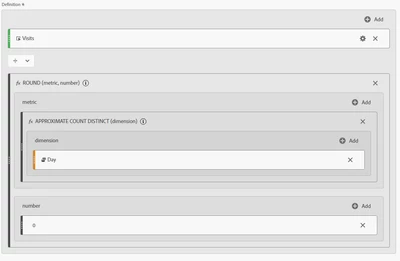
I would then suggest using a daily average calculated metric like so. You can use that as a metric for both experiences. This one is for visits, but you can just replace visits with page views at the top:


Not sure that's what you're looking for but hope it's helpful

1 reply

christel_guidon
Adobe Champion
christel_guidonAdobe ChampionAccepted solution
Adobe Champion
February 28, 2024

So I'm going to assume that you use A4T integration using Adobe Target.

You can split this by experience using the out of the box experience dimension for that

I would then suggest using a daily average calculated metric like so. You can use that as a metric for both experiences. This one is for visits, but you can just replace visits with page views at the top:


Not sure that's what you're looking for but hope it's helpful

kayawalton
Community Advisor and Adobe Champion
February 28, 2024

In addition to @christel_guidon's suggestion, if you do not have Adobe Target, I would create two sequential segments to represent the journeys and drop those as rows in a freeform table to compare to the key performance metrics for your analysis (which in your case looks like visit depth and maybe a calculated metrics for the goal completion.

For additional analysis, I would apply these segments to a fallout visualization to see where customers tend to abandon the journey so you can optimize the new journey even further.

PeterO3Author
Level 2
February 29, 2024

Thanks for your feedback on this. I think I may try and build a sequential segment and then add that they've completed the journey within 4 pageviews and then build another for 5, 6 etc.. which i'm hoping will give me what i want.