Connection to Power BI | Community
Skip to main content
October 13, 2022
Question

Connection to Power BI

  • October 13, 2022
  • 1 reply
  • 1203 views

I am trying to create a data model in Power BI using the Adode Analytics connector 2.0(beta) version as a data source. 

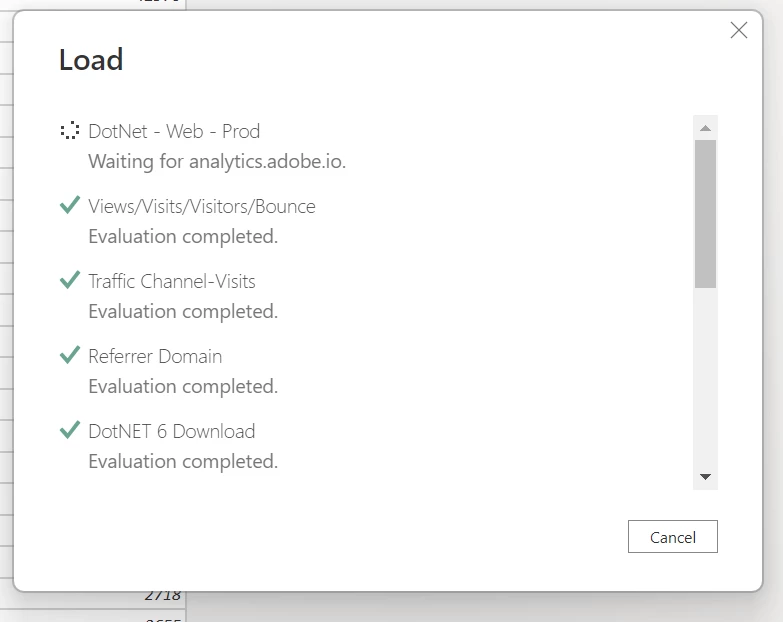
Have tried loading the data couple of times and my screen just shows the image below with no response for more than 30-40mins, until I cancel the load. I applied a few extra steps in the model to filter data. Not sure if this is a Power BI issue or Adobe. Kindly suggest. 


This post is no longer active and is closed to new replies. Need help? Start a new post to ask your question.

1 reply

Level 4
October 13, 2022

I don't have an answer to help with your issue, but just wanted to flag that it's a pity that Adobe does not develop its own connector for Power BI. What you are using is a third-party connector. I suspect they don't have the incentive to do so, because they want us to user their own solutions such as CJA. However, this is unfair to their customers in my view. Also, Adobe and Microsoft have a partnership, which makes the lack of an officially supported connector for Power BI even more absurd.

I wanted to make a correction about my wrong understanding of the issue. The connector is developed by Adobe in partnership with Microsoft, as stated in this video https://www.youtube.com/watch?v=Nf716LdR0z8


It simply hasn't been updated in a long while and it's laggy.

v-mepatelAuthor
October 13, 2022

Thanks for clarifying, that definitely helps to understand that it's a third-party connector issue.