Conditional Formatting: Positive or Negative values | Community
Skip to main content
Level 3
June 21, 2023
New

Conditional Formatting: Positive or Negative values

  • June 21, 2023
  • 3 replies
  • 1532 views

The settings for Conditional Formatting don't allow for what I want: a simple two-color scheme - positive all green, negative all red.

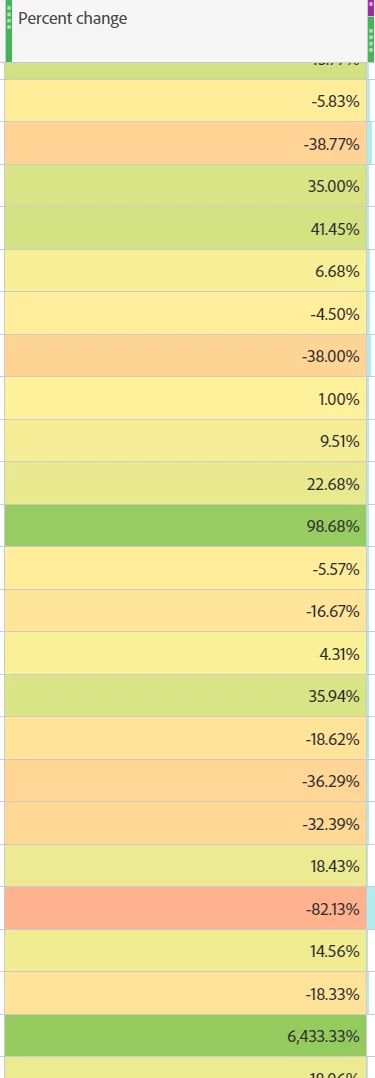
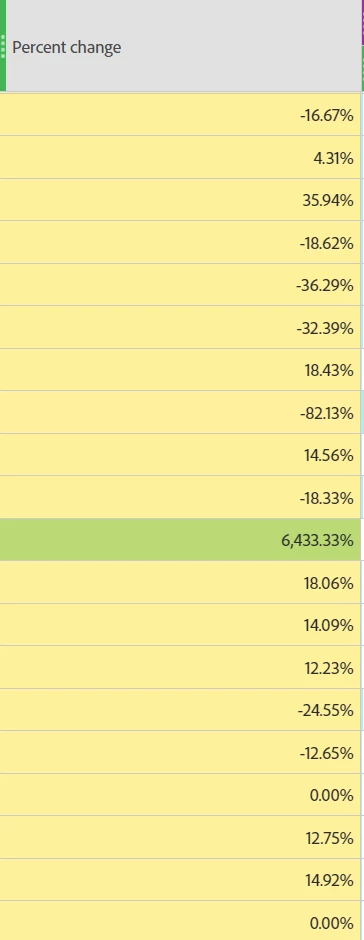
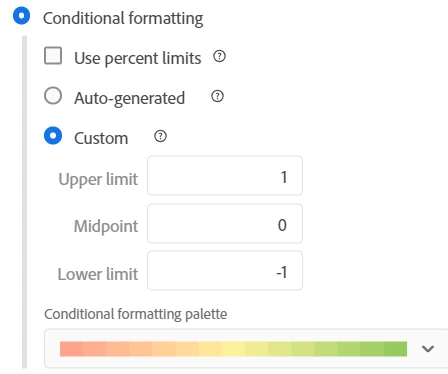
Even turning off the auto-generate and putting 0 for the midpoint, AA still calculates ranges based on values. Here, the highest value, 6,443 is so far above the others that it assigns it green, but then plus 36 and minus 36 have the same color because they're relatively closer. Setting the max, mid, and min values to +1, 0, and -1 gets closer to what I want, but still shows plus 6 and minus 4 values as the same color. This is trivially easy to do in Excel....
    

3 replies

Jennifer_Dungan
Community Advisor and Adobe Champion
June 21, 2023

You can get a 2 colour scheme (or well.. 3 colour scheme if the value is exactly 0%)... the problem with your settings is that your column is in percent (100% is "1" and -100% is "-1") so all the % are falling between your min and max....


Or use "percent limits", rather than decimal:


You just have to adjust your scale to work better with your values...


I just threw some fake values in to show a Proof of Concept:


DavidLu17Author
Level 3
June 22, 2023

That works, thanks, Jennifer!

Jennifer_Dungan
Community Advisor and Adobe Champion
June 22, 2023

You're welcome @davidlu17; sometimes you just have to get a little more creative 🙂