"Compare Time Periods" option in workspaces not showing up in drop-down | Adobe Higher Education
Skip to main content
Level 2
March 28, 2020
Resuelto

"Compare Time Periods" option in workspaces not showing up in drop-down

  • March 28, 2020
  • 1 respuesta
  • 3564 visualizaciones

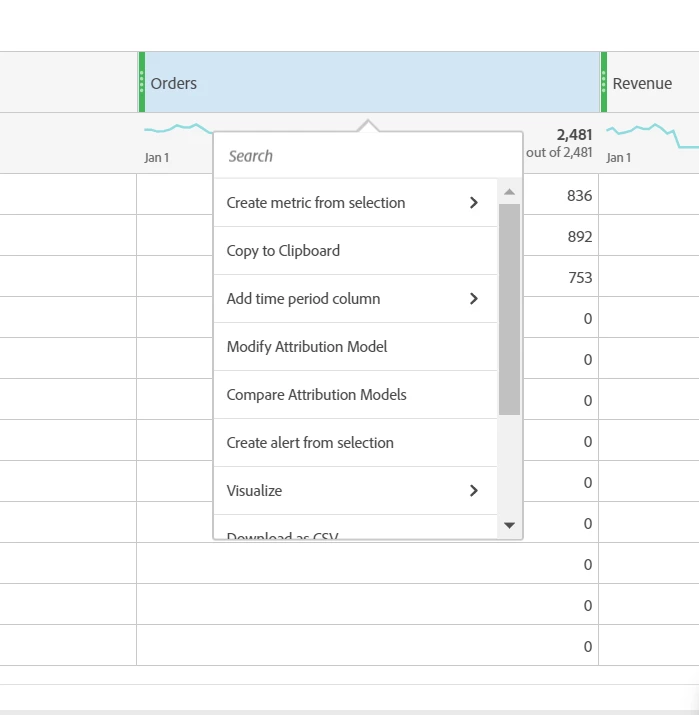
I am trying to do a YoY comparison and the "Compare Time Periods" is not in the drop down. 
 

Este tema ha sido cerrado para respuestas.
Mejor respuesta de ElsaWr
Compare Time Periods will appear for Ranked Reports where the values of the Dimensions are listed. In Trended Reports only Add a Time Period option will appear.

1 respuesta

PratheepArunRaj
Community Advisor and Adobe Champion
March 29, 2020

Dear Wsmith,

What is the Dimension you are using? You cannot have Time Periods in the Dimension to compare i.e. Month, Day, Hour, etc.

Thank You, Arun

Thank You, Pratheep Arun Raj B (Arun) | Xerago | Terryn Winter Analytics
ElsaWrAdobe EmployeeRespuesta
Adobe Employee
March 31, 2020
Compare Time Periods will appear for Ranked Reports where the values of the Dimensions are listed. In Trended Reports only Add a Time Period option will appear.