Classification Importer | Community
Skip to main content
Level 3
July 19, 2024
Question

Classification Importer

  • July 19, 2024
  • 2 replies
  • 789 views

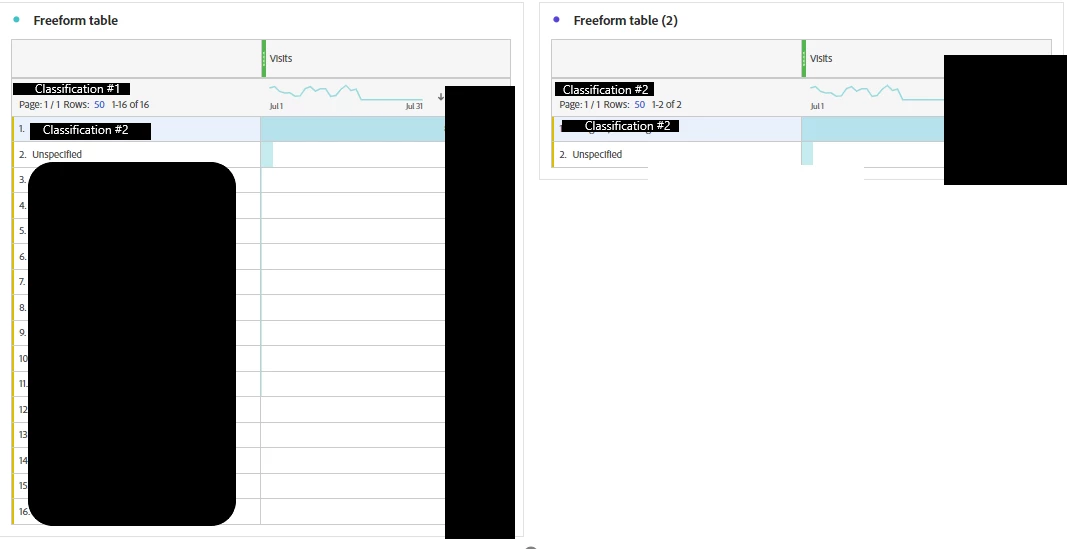
I've used classification importer to reimport the tab files and in one one of the attempts, I ran into this issue where one of the current classifications(classification #2) got grouped under another classification (classification #1) as seen on the photo on the left. Is there a way to delete classification #2 from classification #1? I'm not sure how it got there in the first place. 

For reference, I've also provided how classification #2 looks like. There is no further categorization within it. It's either grouped in classification #2 or it's not and will be bucketed under unspecified. 


Any help is greatly appreciated. Thank you!!
 

This post is no longer active and is closed to new replies. Need help? Start a new post to ask your question.

2 replies

Ankit_Chaudhary
Community Advisor
Community Advisor
July 19, 2024

Hi @user70977 

You can delete classification data by uploading ~empty~ value against it. Check this documentation on delete classification data

user70977Author
Level 3
July 19, 2024

Just want to verify the logic for how to delete classification #2 from classification #1.


Would it make sense to upload all of the pages from classification #2 as the key and in classification #1 column, add "~empty~" for all values? And for the data filter, select rows where classification #1 = ?

kautuk_sahni
Community Manager
Community Manager
September 16, 2024

@user70977 Did you find the suggestion helpful? Please let us know if you require more information. Otherwise, please mark the answer as correct for posterity. If you've discovered a solution yourself, we would appreciate it if you could share it with the community. Thank you!

Kautuk Sahni