Classification - Browser import : Unable to check Overwrite data on conflicts option | Community
Skip to main content
Adobe Employee
April 7, 2024
Solved

Classification - Browser import : Unable to check Overwrite data on conflicts option

  • April 7, 2024
  • 1 reply
  • 706 views

Hi all,

I'm trying to update the tracking code classification data, but the "Overwrite data on conflicts" cannot be checked after uploading the file. I found in the doc that "This option is not available for report suites enabled for the New Classification Architecture"  ,which seems to be the reason. But what means New Classification Architecture? And how can I update the data by browser import?
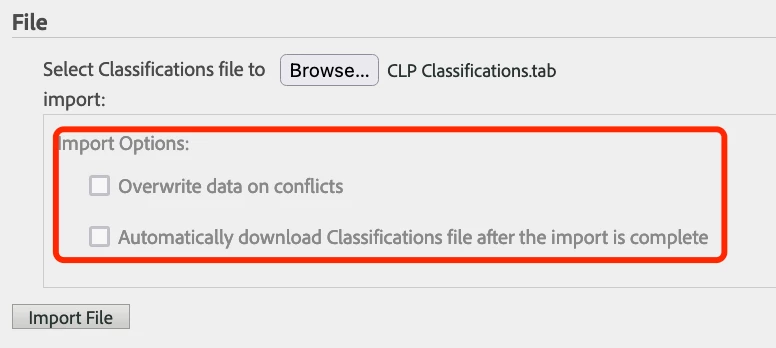
 

Thanks!


This post is no longer active and is closed to new replies. Need help? Start a new post to ask your question.
Best answer by BrianAu1

The remnant UI is certainly confusing, but the New Classification Architecture is referring to Classification Sets and you no longer have to do anything as far as explicit overwrite selection and it will work with overwrite applied as a default now.

1 reply

BrianAu1Adobe EmployeeAccepted solution
Adobe Employee
April 8, 2024

The remnant UI is certainly confusing, but the New Classification Architecture is referring to Classification Sets and you no longer have to do anything as far as explicit overwrite selection and it will work with overwrite applied as a default now.