Can someone explain the steps to block internal traffic using Bot Rules import features | Community
Skip to main content
UjjwalChandra
Level 2
May 15, 2025
Solved

Can someone explain the steps to block internal traffic using Bot Rules import features

  • May 15, 2025
  • 1 reply
  • 922 views

Hi Team,
We want to block the Internal traffic coming on the website form the company employees browsing our company website. What will be the best way to block this traffic from coming to the website. Is it via IP Blocking? And how to get Bot Name, IPs, User Agents? Please explain the steps.


Best answer by Jennifer_Dungan

Hi @ujjwalchandra,


Typically internal traffic is a fairly small list of IP ranges, so I don't think there is an upload process. And this does have to be set per suite, unfortunately.


IP Exclusion and Bot Filtering are similar, but with some key differences.


Internal IP Exclusion will not appear in any report. As this is considered data that is not worth reporting on (as it's internal to your organization)


Bot Traffic however, while excluded from all your standard reporting, has a few dedicated dimensions and metrics that can be used to see what pages or what bots have been hitting your site.
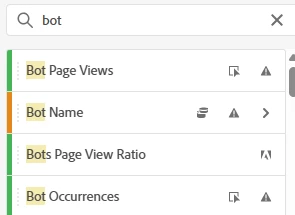


The only "standard" dimension that works with these is Pages, and when you pair Pages with the Bot Page Views metric, you can see how many times each page was hit by a bot.


The Bot Name dimension will populate with bot standard IAB Bot Names (if you have that enable - which is highly recommended), and with the custom name you have applied to each bot rule.


Both Bot Exclusions and Internal IP Filters have to be set per suite... however, Bot Exclusions can at least be set across multiple suites at the same time. In Report Suite Manager, you can select multiple suites, and go to Edit Settings > General > Bot Rules


However, Internal IP Filters are found under Admin > All Admin > Exclude by IP


The selected suite is available in the top right corner, but only one can be selected at a time 😞


I guess they figure this doesn't get updated often enough, so setting it per suite is okay... it would be lovely to have a bulk editor.


1 reply

Harveer_SinghGi1
Community Advisor
Community Advisor
May 15, 2025

Hi @ujjwalchandra ,

I'm not sure what the exact ask is as you have mentioned you want to "block this traffic from coming to the website", does this mean you want to block the website access to these users or want to block the analytics tracking from these users?

For blocking the analytics tracking of internal user's behavior normally IP Exclusion is used where you can provide the list of IPs your company uses filter that traffic out of the external traffic.

Cheers!

UjjwalChandra
Level 2
May 15, 2025

Hi @harveer_singhgi1 ,
Thank you for the response.
Yes, blocking the analytics tracking of the internal users in Adobe Analytics which is considered as company internal traffic. Also, if you can help to let me know 

  • If there is a format to upload a file and which file type is used and the steps.
  • How can I execlude multiple IPs across the regions?
  • Is IP Exclusion and BOT Rules in Report Suite Similar?
Jennifer_Dungan
Community Advisor and Adobe Champion
Jennifer_DunganCommunity Advisor and Adobe ChampionAccepted solution
Community Advisor and Adobe Champion
May 15, 2025

Hi @ujjwalchandra,


Typically internal traffic is a fairly small list of IP ranges, so I don't think there is an upload process. And this does have to be set per suite, unfortunately.


IP Exclusion and Bot Filtering are similar, but with some key differences.


Internal IP Exclusion will not appear in any report. As this is considered data that is not worth reporting on (as it's internal to your organization)


Bot Traffic however, while excluded from all your standard reporting, has a few dedicated dimensions and metrics that can be used to see what pages or what bots have been hitting your site.


The only "standard" dimension that works with these is Pages, and when you pair Pages with the Bot Page Views metric, you can see how many times each page was hit by a bot.


The Bot Name dimension will populate with bot standard IAB Bot Names (if you have that enable - which is highly recommended), and with the custom name you have applied to each bot rule.


Both Bot Exclusions and Internal IP Filters have to be set per suite... however, Bot Exclusions can at least be set across multiple suites at the same time. In Report Suite Manager, you can select multiple suites, and go to Edit Settings > General > Bot Rules


However, Internal IP Filters are found under Admin > All Admin > Exclude by IP


The selected suite is available in the top right corner, but only one can be selected at a time 😞


I guess they figure this doesn't get updated often enough, so setting it per suite is okay... it would be lovely to have a bulk editor.