
Calculated metric function: CUMULATIVE - cannot use functions to set the "number" parameter | Community
Skip to main content
cgullestrup
Level 3
February 2, 2022
Solved

Calculated metric function: CUMULATIVE - cannot use functions to set the "number" parameter

  • February 2, 2022
  • 2 replies
  • 2403 views

I am trying to create a calculated metric, which cumulate a static number based on month of year.


For example each day in January should add 100, but each day in February should only add 50.


I am using the IF function to control which month is in question.


For 'value_if_true' I have added the CUMULATIVE function. In the "number" parameter for the CUMULATIVE function I want to limit only the row for January. Unfortunately, if I add December to the time period it will cumulate 100 for each day of December as well.


If I try to make the "number" parameter dynamic, for example based on a function, for example "ROW COUNT()", then the CUMULATIVE function breaks down completely and do not return any values.


I have tried other functions in place of the "number" parameter and they all seem be broken.


Is this by design or have I misunderstood how to use the "number" parameter?
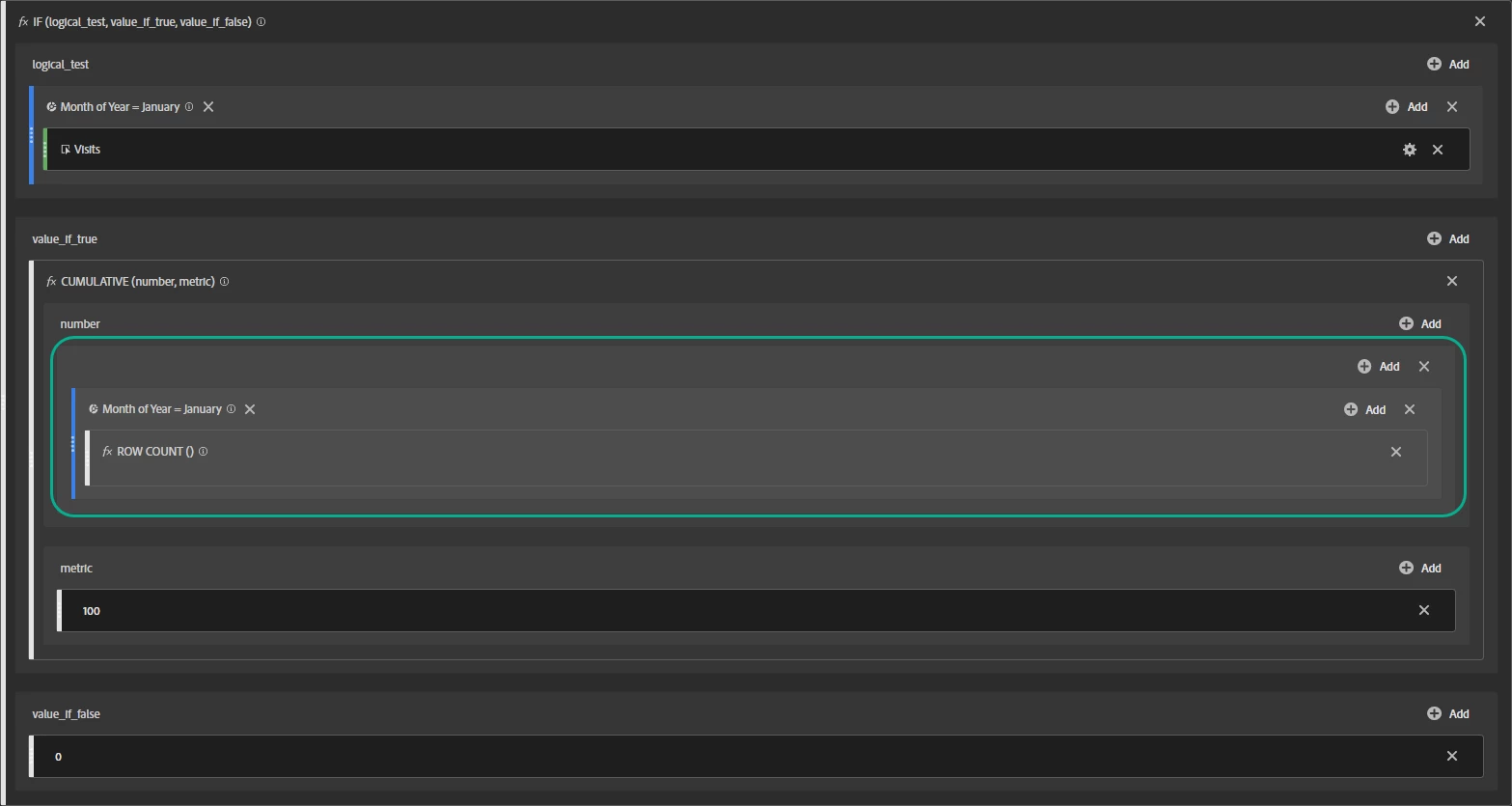
 

Thanks in advance 🙂

This post is no longer active and is closed to new replies. Need help? Start a new post to ask your question.
Best answer by yuhuisg

Here's something that I've learned about Calculated Metrics: they calculate based on the row-wise data. So your Calculated Metric is basically doing this: calculate the value for every row and return the Cumulative per row. But Cumulative should be the "outer" function, i.e. you want: calculate the Cumulative value from the value of each row.

Try this:

CUMULATIVE

  • number: 0
  • metric: IF
    • logical_test: (Month of Year = January) Visits
    • value_if_true: 100
    • value_if_false: IF
      • logical_test: (Month of Year = February) Visits
      • value_if_true: 50
      • value_if_false: IF
        • logical_test: (Month of Year = March) Visits
        • ...

So now for each row, AA should calculate your value from the month, then CUMULATIVE sums them all up. In the end, all of your rows will report that same CUMULATIVE result.

2 replies

yuhuisg
Community Advisor
yuhuisgCommunity AdvisorAccepted solution
Community Advisor
February 2, 2022

Here's something that I've learned about Calculated Metrics: they calculate based on the row-wise data. So your Calculated Metric is basically doing this: calculate the value for every row and return the Cumulative per row. But Cumulative should be the "outer" function, i.e. you want: calculate the Cumulative value from the value of each row.

Try this:

CUMULATIVE

  • number: 0
  • metric: IF
    • logical_test: (Month of Year = January) Visits
    • value_if_true: 100
    • value_if_false: IF
      • logical_test: (Month of Year = February) Visits
      • value_if_true: 50
      • value_if_false: IF
        • logical_test: (Month of Year = March) Visits
        • ...

So now for each row, AA should calculate your value from the month, then CUMULATIVE sums them all up. In the end, all of your rows will report that same CUMULATIVE result.

cgullestrup
Level 3
February 3, 2022

Great thanks - that did the trick.

Pablo_Childe
Community Advisor
Community Advisor
February 2, 2022

Just curious what are you trying to correlate Month data too?


Are you trying to measure a weighted sort of avg for months of year on a set of page(s)?

cgullestrup
Level 3
February 3, 2022

We are going to add sales target numbers throughout the year to compare with actual sales, but these differ from month to month, so there is a need for this per month calculation 🙂

Pablo_Childe
Community Advisor
Community Advisor
February 3, 2022

ok makes sense then!! thanks for clarifying!