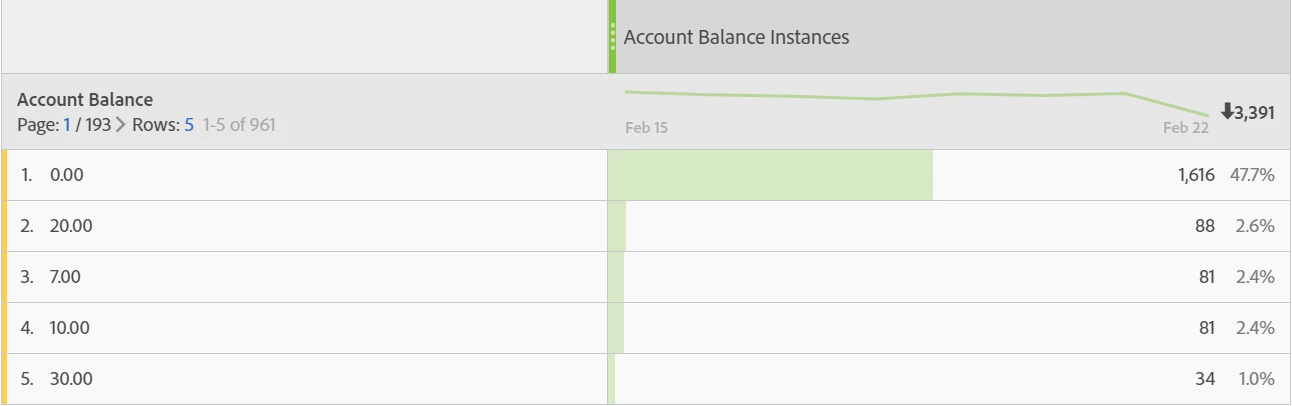
You can try one more thing.
Create a numeric 2 classification on Account Balances.
Set the value as the evar value itself.
If you like to multiply the evar value by the number of instances, then set the rate and hinge to instance. Otherwise set them to fixed.
example: here is my sample bogus data.
| units | Instances |
| 87401 | 120 |
| 61438 | 111 |
| 310347 | 109 |
| 820673 | 100 |
| 83217 | 100 |
| 691723 | 100 |
| 38011 | 99 |
| 52388 | 96 |
| 843148 | 96 |
I created a numeric 2 classification, and sent in these values depending on the first column:
| Key | ~numeric2 test | ~numeric2 test^~id~ | ~numeric2 test^~value~ | ~numeric2 test^~period~ | ~numeric2 test^~rate~ | ~numeric2 test^~hinge~ |
| 87401 | 87401 | | 87401 | 2015/01/01 - 2035/12/31 | instance | instance |
| 38011 | 38011 | | 38011 | 2015/01/01 - 2035/12/31 | instance | instance |
| 61438 | 61438 | | 61438 | 2015/01/01 - 2035/12/31 | instance | instance |
| 83217 | 83217 | | 83217 | 2015/01/01 - 2035/12/31 | instance | instance |
| 820673 | 820673 | | 820673 | 2015/01/01 - 2035/12/31 | instance | instance |
| 52388 | 52388 | | 52388 | 2015/01/01 - 2035/12/31 | instance | instance |
| 310347 | 310347 | | 310347 | 2015/01/01 - 2035/12/31 | instance | instance |
| 691723 | 691723 | | 691723 | 2015/01/01 - 2035/12/31 | instance | instance |
| 261438 | 261438 | | 261438 | 2015/01/01 - 2035/12/31 | instance | instance |
| 843148 | 843148 | | 843148 | 2015/01/01 - 2035/12/31 | instance | instance |
| 579872 | 579872 | | 579872 | 2015/01/01 - 2035/12/31 | instance | instance |
The date I have used is a large one which covers my historical timeframe and will work for the foreseeable future. You can keep what you like.
On uploading I can use the classification I have created as a metric:
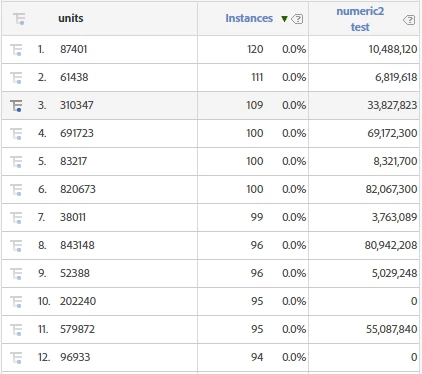
As you can see it has multiplied the values with the instances. The total would be given at the bottom of the report. Those which are not classified (yet) are shown as zeroes. You can simply classify those values to correct them out.
Note that there is a limitation. Numeric 2 classification metrics are not available in Workspace or Ad Hoc