Level 2
Feb 21, 2025 2:32 PM UTC
Solved

Auto apply 400 rows for all the breakdowns in CJA

Hi Everyone

I have a Report in CJA 

Day                                               Events
Day 17
      Asset_id  Rows 400 
         1 A_id
         2 B_ID
         3 C_ID
         4 D_ID
         5 E_ID
Day 18 400 rows (but showing only 5)
        Asset ID
Day 19 400 rows (but showing only 5)
      Asset ID
Day 20 400 rows (but showing only 5)
... so on and forth till Day 200
There is Asset_id in all Days

The Question is I have to keep all the rows to maximum to 400 for Asset_ID
If I will do it manually like increasing rows to 400, It will take a lot if time 
Is there any way ? i.e. all the rows should show 400 rows by itself



Jennifer_Dungan
Jennifer_DunganAccepted solution
Adobe Champion and Community Advisor
Feb 22, 2025 3:37 AM UTC

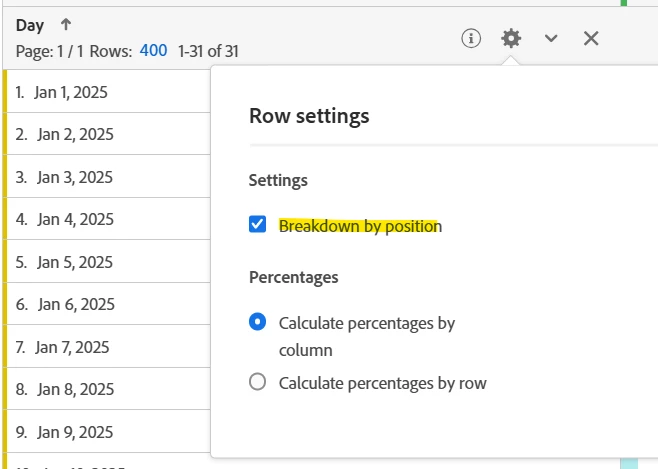
While the process is a bit manual, if you create your table with "breakdown by position" selected:


And then you choose "400" as your breakdown on each row, as new Days roll in, they should maintain the 400 rows breakdown.


I don't know of anyway to do this in one step, but once you have set this up the first time, you shouldn't have to continue to chose those breakdowns each week or month, etc that you are pulling the report.


4 replies

RajatArAuthor
Level 2
Feb 21, 2025 2:35 PM UTC

The reason I need all 400 rows for all breakdown is 
I want to send the csv file and When I click on Send File and then send it as csv THEN it only shows the rows displayed in the report

Translate
AnitaMummert
Adobe Champion
Adobe Champion
Feb 21, 2025 6:46 PM UTC

Hi @rajatar ,

I'm not aware of any way to have the default setting in Workspace return 400 rows every time, but have you tried using Full Table Export for this? It's easier to set up than you might think, and you can then get a CSV file that contains all the rows of data, and rather than breakdowns, you'll have columns for each of your additional dimensions. The only caveat is that when viewing in Excel, you have to be conscious of the total number of rows in the resulting file  (should be less than 1.048 million rows). 


I've had success setting up an AEP Data Landing Zone for storing my exports, and then using the Microsoft Azure Storage app to retrieve them.


Translate
Jennifer_Dungan
Adobe Champion and Community Advisor
Jennifer_DunganAdobe Champion and Community AdvisorAccepted solution
Adobe Champion and Community Advisor
Feb 22, 2025 3:37 AM UTC

While the process is a bit manual, if you create your table with "breakdown by position" selected:


And then you choose "400" as your breakdown on each row, as new Days roll in, they should maintain the 400 rows breakdown.


I don't know of anyway to do this in one step, but once you have set this up the first time, you shouldn't have to continue to chose those breakdowns each week or month, etc that you are pulling the report.


Translate
manojsingh-tech
Level 2
Feb 24, 2025 8:46 PM UTC

@rajatar  I don't think so there is any out of the box solution, Because keep that in mind if we are doing this for many elements in the freeform table you will not able to read the data, and your report is going to become very slow, so keep all that in mind. My suggestion is that don't use this way

Translate