Solved
Analytics Data Sources throwing Error
I am trying to upload data through API, however after successfully uploading data I am getting the following error message:
Notes
The file could not be processed due to the following conditions:
•  Column header "meta_cost" is not a valid column header
•  Column header "meta_impressions" is not a valid column header
•  Column header "meta_reach" is not a valid column header
•  Column header "meta_clicks" is not a valid column header
•  Column header "meta_campaign" is not a valid column header
•  Column header "meta_adset" is not a valid column header
•  Column header "meta_ad" is not a valid column header
•  Column header "meta_objective" is not a valid column header
•  At least one enabled metric is required
•  At least one enabled dimension is required
Data Source Creation Query:
import requests

url = "https://api.omniture.com/admin/1.4/rest/?method=DataSources.Save"

headers = {
    "x-api-key": CLIENT_ID,
    "Authorization": "Bearer "+ACCESS_TOKEN,
    "Content-Type": "application/json"
}

payload = {
    "reportSuiteID": REPORT_SUITE_ID_STAGE,
    "dataSourceID": 2,
    "email": EMAIL,
    "name": "Meta Insights",
    "processing_type": "generic",
    "settings": {
        "allowOutOfOrderHits": True,
        "stopOnWarning": True,
        "metricNames": ["Meta_Cost","Meta_Impressions","Meta_Reach","Meta_Clicks"],
        "metricEvents": ["event801", "event802", "event803", "event804"],
        "dimensionNames": ["Meta_Campaign","Meta_AdSet","Meta_Ad", "Meta_Objective"],
        "dimensionVariables": ["evar180", "evar181","evar182","evar183"]
    }
}

response = requests.post(url, headers=headers, data=json.dumps(payload))
Data Upload Query:
import requests

url = "https://api.omniture.com/admin/1.4/rest/?method=DataSources.UploadData"

headers = {
    "x-api-key": CLIENT_ID,
    "Authorization": "Bearer "+ACCESS_TOKEN,
    "Content-Type": "application/json"
}

payload = {
    "reportSuiteID": REPORT_SUITE_ID_STAGE,
    "dataSourceID": 2,
    "jobName": 'Meta Dummy Data Upload',
    "finished": True,
    "columns": ["Date","Meta_Cost","Meta_Impressions","Meta_Reach","Meta_Clicks","Meta_Campaign","Meta_AdSet","Meta_Ad", "Meta_Objective"],
    "rows": [
        ["01/18/2024",'2000','2000','3000','200',"Test 1", "Test 2", "Test 3", "Test 4"],
        ["01/18/2024",'2000','2000','3000','200',"Test 5", "Test 6", "Test 7", "Test 8"]
    ]
}

response = requests.post(url, headers=headers, data=json.dumps(payload))
Data Source Summary:
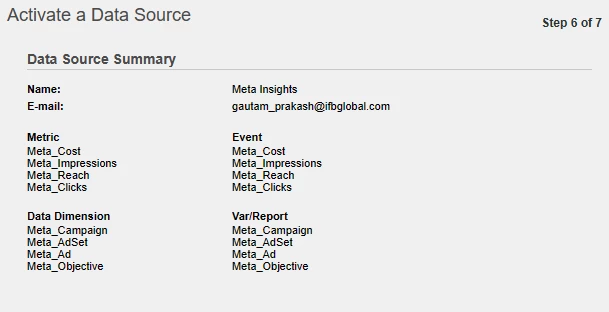
Please suggest how to fix.