


Allow items with zero value to be not shown in workspace
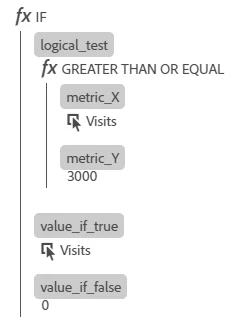
When using If condition in calculated metric formula, the unsatisfied values need to be set to '0'.
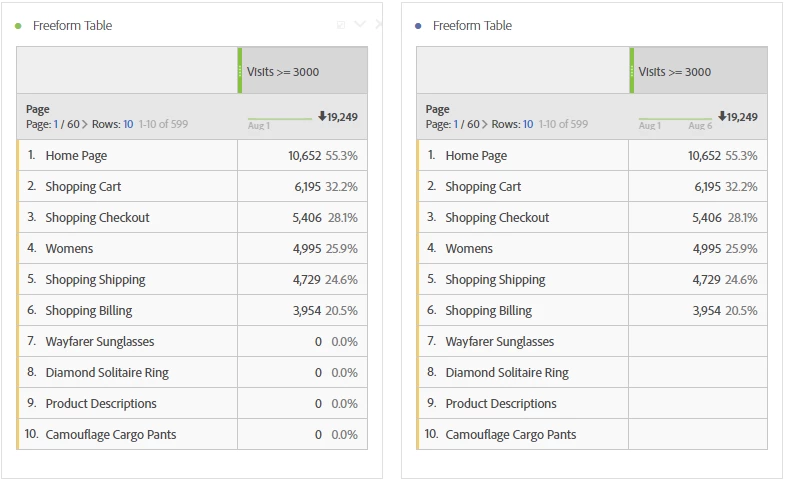
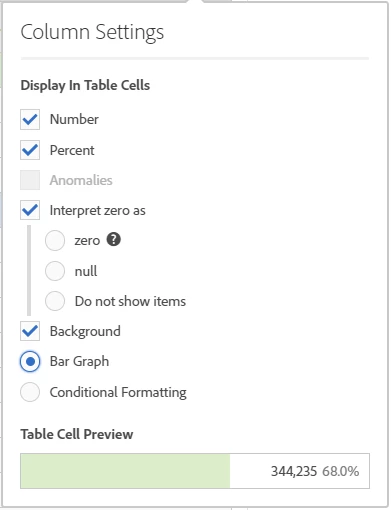
These line items still show up in the report with zero value and there is no option to have them excluded by default. The most is to display the zero as no value. However, copying these values or extracting them still copies over the underlying zero value and the report it self show these line items.
Example calculated metric:
This is how the current setup shows the data with the two options available:
Ask: Change the checkbox for interpreting the zero to radio buttons and provide the extra option to exclude values which are having zeroes against them in all columns
Additional Ask: If this is idea is implemented, it would be a good idea to show only the total for the qualifying data at the top of the column and not site-wide total.