All metrics and breakdowns of data warehouse report saved in one ceel | Adobe Higher Education
Skip to main content
marieg45657908
Level 2
December 19, 2017
Beantwortet

All metrics and breakdowns of data warehouse report saved in one ceel

  • December 19, 2017
  • 4 Antworten
  • 2561 Ansichten

Hello,

When downloading my report with four metrics of the data warehouse, all information is saved in one cell of a row instead of different columns.

Like that, it's hard for me to filter my data.

As-is
Page URL,"Pages","Time Spent on Page > 30 seconds","Time Spent on Page ≤ 30 seconds","Page Views","Visits"
https://www.url-a.com/pagename-a.html,"pagename-a","0","1",13,9
https://www.url-b.com/pagename-b.html,"pagename-b","1","0",18,15

Should-be

Page URLPages
Time Spent on Page > 30 secondsTime Spent on Page ≤ 30 secondsPage ViewsVisits
https://www.url-a.com/pagename-a.html pagename a01139
https://www.url-b.com/pagename-b.html pagename b101815

Can anyone please assit how to set up my report?

Thanks, Marie

Dieses Thema wurde für Antworten geschlossen.
Beste Antwort von PratheepArunRaj

Dear Marie,

Datawarehouse only has CSV and TDE file formats.

Mostly Excel detect the CSV file to text the columns. If not, please use the below.

It is about how you delimiting the comma's in Excel Editor(Hope you are using Microsoft Excel).

1. Open CSV File in Excel.

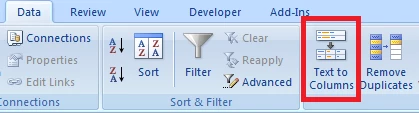
2. Select the column(Only one column now right?) and click "Text To Columns"

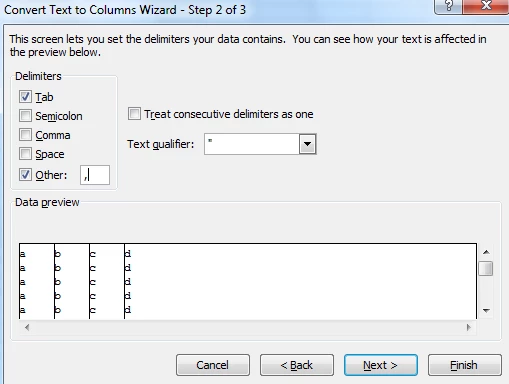
3. Click on "Delimited" and click next.

4. In Delimiters, check "Others" and type comma ",".

5. Click "Finish" to see the columns populating correctly.

If you are using other editors than MS Excel, I dont have any idea.

Thank You!

Arun

4 Antworten

Hyder_Ziaee
Adobe Employee
Adobe Employee
December 19, 2017

What editor are you using? The file is having comma separated values. You will need to take that into account.

marieg45657908
Level 2
December 19, 2017

I'm an admin. So it has always this format with comma seperated values? This can't be changed?

PratheepArunRaj
Community Advisor and Adobe Champion
December 20, 2017

Dear Marie,

Datawarehouse only has CSV and TDE file formats.

Mostly Excel detect the CSV file to text the columns. If not, please use the below.

It is about how you delimiting the comma's in Excel Editor(Hope you are using Microsoft Excel).

1. Open CSV File in Excel.

2. Select the column(Only one column now right?) and click "Text To Columns"

3. Click on "Delimited" and click next.

4. In Delimiters, check "Others" and type comma ",".

5. Click "Finish" to see the columns populating correctly.

If you are using other editors than MS Excel, I dont have any idea.

Thank You!

Arun

Thank You, Pratheep Arun Raj B (Arun) | Xerago | Terryn Winter Analytics
marieg45657908
Level 2
December 20, 2017

Wow, thank you Arun. That worked perfectly.