Alerts when metric is 0 | Community
Skip to main content
Level 2
February 24, 2021
Solved

Alerts when metric is 0

  • February 24, 2021
  • 2 replies
  • 979 views

Hi community,


I'm trying to create some simple alerts when specific metrics drop to 0, to catch cases where tracking has broken for some reason.


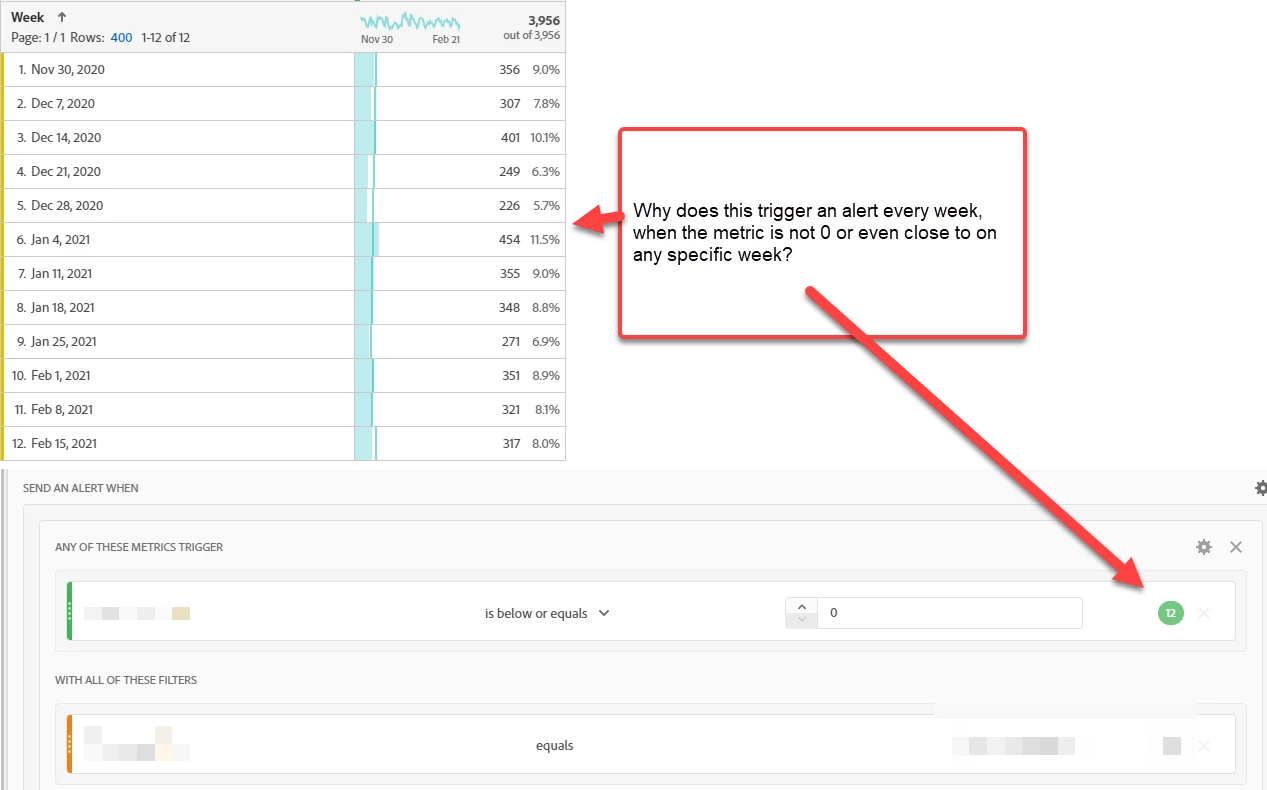
I would expect to be able to do this with the "is below or equals" operator, but for some reason the preview states it would create a false positive every week. So how to achieve this?


I've also tried to achieve this with "Anomaly is below expected" set to 99.9% threshold, which I would expect to be precise enough to catch cases where a metric drops to 0 or near 0. But that already gives an alert where the anomaly is 40% below expected, which is way too sensitive. How to understand the relationship between threshold and anomaly percentage?
 

This post is no longer active and is closed to new replies. Need help? Start a new post to ask your question.
Best answer by PratheepArunRaj

Dear Jusaha,

Guess the alert is triggering with the consideration of 'Is above or equals' 0 rather than 'Is below or equals' 0.

Can you change the condition to some other and reassign it to see? If it is still showing the same, it is a bug for sure. You should reach Customer Care.

And, you have applied a Segment in the Alert. I hope you have applied the same segment while giving us the workspace screengrab. If not, apply the segment to see the results.

Thanks, Arun.

2 replies

PratheepArunRaj
Community Advisor and Adobe Champion
PratheepArunRajCommunity Advisor and Adobe ChampionAccepted solution
Community Advisor and Adobe Champion
February 28, 2021

Dear Jusaha,

Guess the alert is triggering with the consideration of 'Is above or equals' 0 rather than 'Is below or equals' 0.

Can you change the condition to some other and reassign it to see? If it is still showing the same, it is a bug for sure. You should reach Customer Care.

And, you have applied a Segment in the Alert. I hope you have applied the same segment while giving us the workspace screengrab. If not, apply the segment to see the results.

Thanks, Arun.

Thank You, Pratheep Arun Raj B (Arun) | Xerago | Terryn Winter Analytics
jusaha1Author
Level 2
March 4, 2021

Thanks, I've changed the operator around but doesn't seem to make any difference, so must be a bug then. I do have the same segment applied both in the report and alert, but yes good point that too.