Advance calculated Metric | Community
Skip to main content
Level 1
April 9, 2026
Question

Advance calculated Metric

  • April 9, 2026
  • 1 reply
  • 22 views

Hi all,

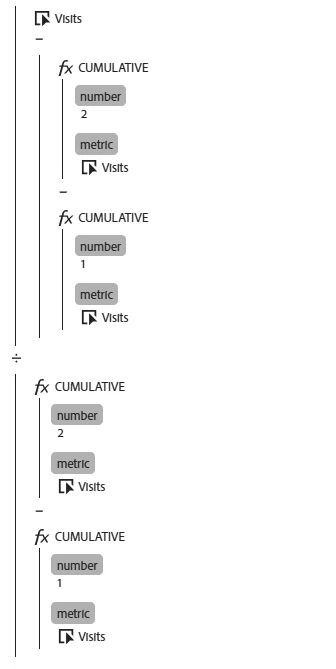
Im trying to calculate YoY% metric using CUMULATIVE fx advanced function. Do you know the cirteria or formula to calculate it base on this type of fuctions? I did MoM% and its perfectly done (see image below) but a tried to do it for YoY (ex: march 2025 vs march 2026) and was not able to do it. Does anyone know it? Could anyone help me? Do I have to use other advanced fuction? Thanks in advance for your help and experience!
 

1 reply

MandyGeorge
Community Advisor and Adobe Champion
April 9, 2026

Ok this is actually a really creative way to do comps! The caveat with this is that you have to put it against the month dimension in order for it to calculate the MoM, since the cumulative relies on the rows.

That being said, if you want YoY instead of MoM, but for a specific month, you would need to have 13 months in your table (TY’s month and all the way back to the YoY month). Then for your cumulative, instead of 2 and 1 for the numbers, you would use 13 and 12. So that would go back 13 rows to the same month last year, and then for that month TY, it would show you the comp value.

However, you’re going to end up with a lot of rows in your table that don’t return any value at all because of how it works, unless you use “display only selected rows”. Fortunately, because the functions work a bit funky this will still work for what you need. But you still need to have the longer time period either as your panel date range or as a date range in your table.

ClaraDeAuthor
Level 1
April 9, 2026

Hi Mandy!!

Does this mean I have to replace all the 2s in the formula I sent with 13s, and all the 1s with 12s? Based on this, the current 1s and 2s in the formula shouldn't appear, right?

Thank you for your kind response!

MandyGeorge
Community Advisor and Adobe Champion
April 9, 2026

Correct. 

Think about how your table is laid out:

March 2025
April 2025
May 2025
June 2025
July 2025
August 2025
September 2025
October 2025
November 2025
December 2025
January 2026
February 2026
March 2026


When you have Cumulative 2 - that is taking two rows, the current row and the one before it. Then subtracting cumulative 1 - aka the current row. That leaves you with just the month before.

So in the table above, March 2026 would be compared to the 1 row above it, Feb 2026.


But now you want a YoY number. so you take cumulative 13, taking the current row plus the 12 rows above it. Subtract cumulative 12, the current row plus the 12 above it. That leaves only the value for the row 13 rows up. So if you’re looking at March 2026, it will compare to March 2025.