Adobe target columns in click stream | Community
Skip to main content
Level 2
February 4, 2025
Solved

Adobe target columns in click stream

  • February 4, 2025
  • 2 replies
  • 807 views

https://www.softcrylic.com/blogs/adobe-analytics-for-target-a4t-a-look-under-the-hood/

I found this article and found few columns which are useful, however does the click stream have a column for name of expereince instead of the code ?

also I found that for some users tnt_action has two exp id in a hit, any way to clean this up


end objective is to create a dashboard with drop down to select relevant exp and see the results
Best answer by Jennifer_Dungan

I don't have Target, but if you are talking about the Analytics Raw Data feeds, I don't believe that Target data is included... however, the data should be available via API calls, as @abhinavpuri mentioned.


To access the Oberon debugger:


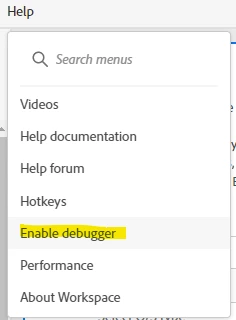
In your Workspace, first turn on debugging from the help menu:


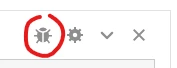
This will add a new icon on your freeform tables:


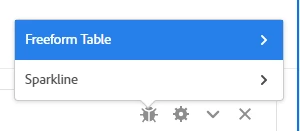
When you click on this, it will have a few options: the data building the Freeform table, or the data building the Sparkline (you will likely want the table data)


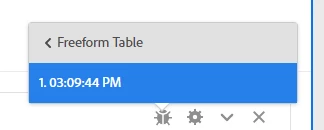
Now, you will see one or more timestamps... every time the data refreshes, a timestamp will appear... but some complex tables may actually be built using multiple calls. You will have to click on each timestamp to access a new page that will provide the API calls that were used in multiple formats.


2 replies

abhinavpuri
Community Advisor and Adobe Champion
February 4, 2025

Hi @rohitna1 ,


Have you tried A4T panel in Adobe Workspace, you can build an report with Activity > Experience and use Oberon debugger to extract JSON payload.

This can be used to fetch reports using Adobe Analytics API2.0 and setup dashboard with filter.

Jennifer_Dungan
Community Advisor and Adobe Champion
Jennifer_DunganCommunity Advisor and Adobe ChampionAccepted solution
Community Advisor and Adobe Champion
February 4, 2025

I don't have Target, but if you are talking about the Analytics Raw Data feeds, I don't believe that Target data is included... however, the data should be available via API calls, as @abhinavpuri mentioned.


To access the Oberon debugger:


In your Workspace, first turn on debugging from the help menu:


This will add a new icon on your freeform tables:


When you click on this, it will have a few options: the data building the Freeform table, or the data building the Sparkline (you will likely want the table data)


Now, you will see one or more timestamps... every time the data refreshes, a timestamp will appear... but some complex tables may actually be built using multiple calls. You will have to click on each timestamp to access a new page that will provide the API calls that were used in multiple formats.


RohitNa1Author
Level 2
February 4, 2025

Thanks but can this be done for all the experiments ? 

lets say for last 2 years all wihtout any sampling or data accuracy limitation ?

Level 2
February 4, 2025

As long as the data for experiment is a available in A4T Adobe Analytics for last two years. It can be exporrted via reporting API.