Level 2
October 28, 2024
해결됨

Adobe report builder is not working in excel

  • October 28, 2024
  • 7 답변들
  • 1844 조회

Adobe report builder is not working in excel, I reintalled the same but not able to to see the option and the addin addition is not working,


Anyone faced similar situation sharing screenshot of addin section and excel options.

the error below is what am seeing when am trying to activate the disable application. the second image is add in view.


이 주제는 답변이 닫혔습니다.
최고의 답변: RohitNa1

HI ALL,
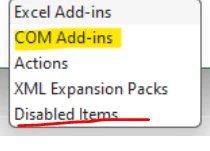
I found the solution to the problem. the adobe report builder was disabled in the last option.


7 답변

FarazHusain
Adobe Employee
Adobe Employee
October 28, 2024

Can you check if the below setting is unchecked in MS Excel (Require Application Add-ins to be signed by Trusted Publisher)?


RohitNa1작성자
Level 2
October 28, 2024

Add ins are disbaled  by IT, so not sure if I can see this.

Jennifer_Dungan
Adobe Champion and Community Advisor
October 28, 2024

I've had some issues where my Report Builder got disabled... I think I fix it by opening up my Excel Options, and going to Add-ins.


And making sure that Report Builder is selected:


Or it might show under the "Disabled Items", and you need to activate it there... it's been a while since I've had the issue... 

RohitNa1작성자
Level 2
October 28, 2024

I tried this the first option is not adding at all I tried it multiple times.

Jennifer_Dungan
Adobe Champion and Community Advisor
October 28, 2024

If you are locked down by IT, you may have to contact them to enable it for you. Given that this is part of the toolbox you are paying for with Adobe, they shouldn't have any reason not to grant access....

Pablo_Childe
Community Advisor
Community Advisor
October 29, 2024

There are a couple potential things you need to check.


See if port 443 is available to you on the PC you access the excel file in.

Are you using a VPN ? If yes try a different internet connection.

Less rare but possible are you on a physical network that is using VLAN if yes again try a different internet and physical connection.


GLTU

RohitNa1작성자답변
Level 2
November 5, 2024

HI ALL,
I found the solution to the problem. the adobe report builder was disabled in the last option.