Adobe Client Data Layer Push method | Adobe Higher Education
Skip to main content
Level 2
April 17, 2022
解決済み

Adobe Client Data Layer Push method

  • April 17, 2022
  • 1 の返信
  • 1620 ビュー

Hi, I am currently using the Adobe Client Data Layer to collect my page data. I am able to see the collected data when I type "window.adobeDataLayer", but when I use "adobeDataLayer.getState()", it shows me an empty array without any page data: 
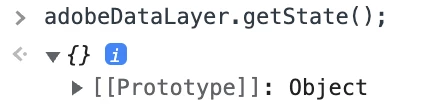


I know that is because I used the following method to pass the data to adobeDataLayer, instead of the push method (adobeDataLayer.push()):



So I am quite confused, since using this method I am able to see the collected data when "window.adobeDataLayer", but not "adobeDataLayer.getState()", what are the differences between these two? And is this the right way to store the data in adobeDataLayer? Is it a must to use the adobeDataLayer.push() method?


Any insights would be greatly appreciated! 

 

このトピックへの返信は締め切られました。
ベストアンサー yuhuisg

There is a script that needs to be installed to use ACDL. That script modifies the adobeDataLayer array's push() method, so that ACDL is able to set-and-update values within its own internal, computed data layer, and so that getState() can return what you expect it to.

So the simple solution is: always use push(), don't use any other JavaScript array methods, e.g. setting adobeDataLayer[0].

1 の返信

yuhuisg
Community Advisor
yuhuisgCommunity Advisor回答
Community Advisor
April 19, 2022

There is a script that needs to be installed to use ACDL. That script modifies the adobeDataLayer array's push() method, so that ACDL is able to set-and-update values within its own internal, computed data layer, and so that getState() can return what you expect it to.

So the simple solution is: always use push(), don't use any other JavaScript array methods, e.g. setting adobeDataLayer[0].

YZ_J作成者
Level 2
April 21, 2022

Hi Yuhui, 

Thank you for your answer!