
Adobe Campaign Classic Triggers / Analytics product profile | Community
Skip to main content
Darren_Bowers
Level 9
February 18, 2021
Solved

Adobe Campaign Classic Triggers / Analytics product profile

  • February 18, 2021
  • 1 reply
  • 1458 views

I am cross-posting this in the remote chance that someone from Analytics knows the answer to this question.

Adobe Campaign Triggers implementation uses Adobe I/O to create the JWT authentication between Analytics and Campaign : https://experienceleague.adobe.com/docs/campaign-classic/using/integrating-with-adobe-experience-cloud/experience-triggers/configuring-adobe-io.html?lang=en#adobe-io-prerequisites

Step 9 in the instructions selects an Analytics Product Profile that has been configured specifically for Triggers: "Choose the product profile called Analytics-< Org Name >"

However, nobody in Adobe Support or Consulting knows how this Product Profile is configured or what permissions this profile requires for Triggers to function.

Does anyone here know what permissions, etc would be required in this profile?

Thanks
Darren
Original post: https://experienceleaguecommunities.adobe.com/t5/adobe-campaign-classic-questions/configuring-adobe-i-o-jwt-connectors-for-triggers/qaq-p/396801

This post is no longer active and is closed to new replies. Need help? Start a new post to ask your question.
Best answer by Andrey_Osadchuk

Hi Darren,


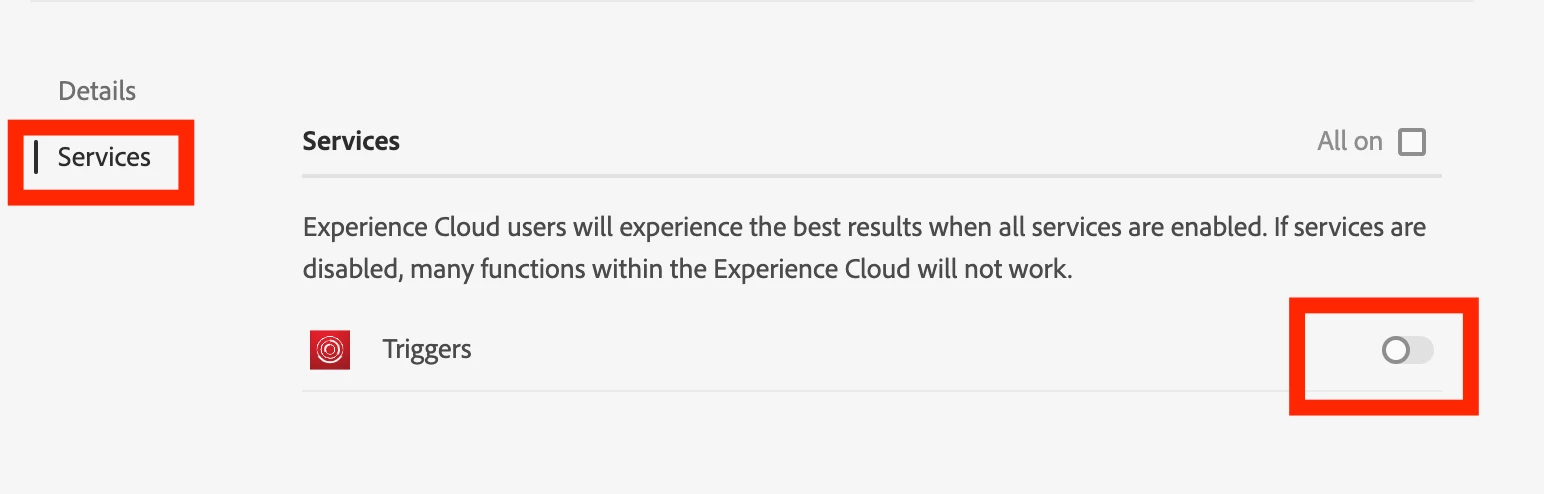
I assume the product profile should have the triggers enabled as shown in the screenshot below. To do this, open the Analytics product profile in Admin Console, click on Settings (under the profile name) and switch to Services.


1 reply

Andrey_Osadchuk
Andrey_OsadchukAccepted solution
Level 10
February 19, 2021

Hi Darren,


I assume the product profile should have the triggers enabled as shown in the screenshot below. To do this, open the Analytics product profile in Admin Console, click on Settings (under the profile name) and switch to Services.


Darren_Bowers
Level 9
February 22, 2021

Hi Andrey 🙂

Thanks for this - I believe this is part of the setup documentation that is missing. I think I have found this option and also linked the API credentials within the Analytics Profile, but there is also a lot of permissions within the Product Profile that need to be set up.

I am assuming that the Triggers API should not be given ALL permissions to the Analytics instance, but I am unsure what permissions we should be giving it as there is no documentation.

The legacy Analytics API oAuth connectors have "everything" access I believe, so its possible Adobe just grant full access to everything using the Product Profile.

Just unsure if the hacky shotgun approach is the best approach?

Cheers

Darren