
Adobe API - 504 Gateway Timeout | Community
Skip to main content
KyleViz
Level 2
April 23, 2024
Solved

Adobe API - 504 Gateway Timeout

  • April 23, 2024
  • 2 replies
  • 3947 views

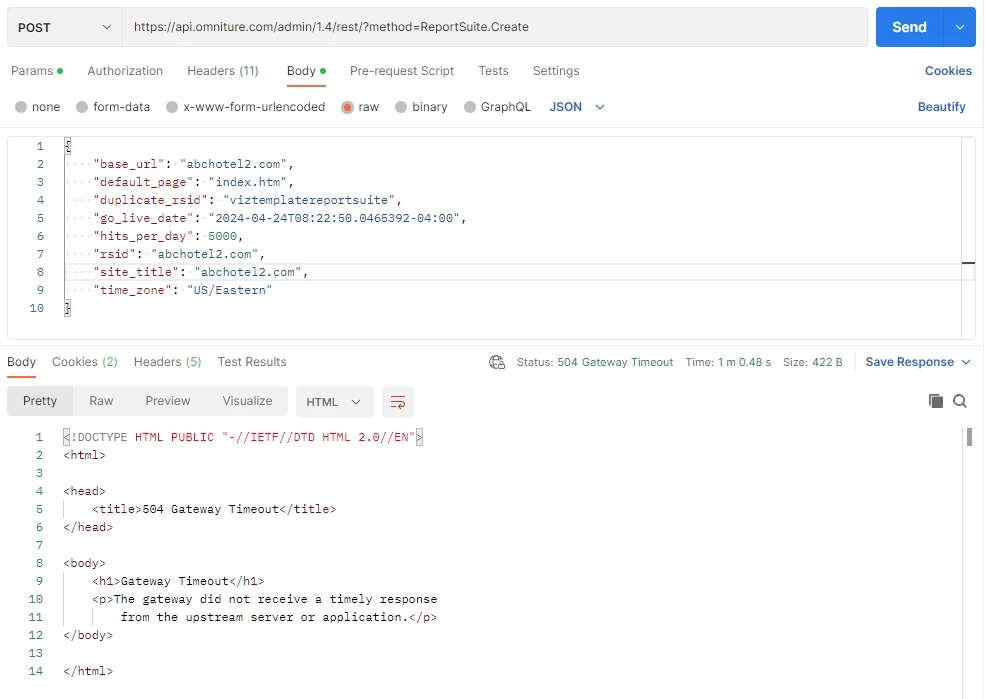
The Adobe API is responding with a 504 Gateway Timeout any time a request goes over 60 seconds long. We are repeatedly getting this when trying to create report suites by duplicating an existing template report suite (a process that takes Adobe a while to complete). See the attached screenshot for a Postman example of this occurring. We just migrated from Service Account (JWT) credential to OAuth Server-to-Server credential when this started happening, not sure if that is related.
 

Best answer by KyleViz

Did you have this resolved? what was the resolution?


We actually just closed the case today. We were told that Adobe engineering increased the timeout from 60 seconds to 500 seconds. I at least confirmed that we are no longer getting the timeout error when going slightly over 60 seconds now (sometimes our call completed just under 60 seconds and sometimes it went over).

2 replies

Jennifer_Dungan
Community Advisor and Adobe Champion
April 23, 2024

This looks like a good candidate to talk to Client Care about... they can dig a lot deeper into what is happening and hopefully find the issue a lot faster than us suggesting things to try.


Good Luck!

KyleViz
KyleVizAuthor
Level 2
April 23, 2024

Yes I do have a support case going (no word yet) but thought I'd post about it too in case anyone else has experienced it before or has the issue in the future. I will report back what the support team says as well.

June 6, 2024

Did you have this resolved? what was the resolution?

KyleViz
KyleVizAuthor
Level 2
May 2, 2024

Adobe responded that they had addressed some issues recently but we are still experiencing the issue and requested they keep investigating.

January 8, 2025

Having this issue again today - 504 error.  Have tried literally everything - refreshing, clearing cache, different browsers. people working remotely also trying, IT checked firewall, people trying various devices - and submitted a zendesk ticket to Adobe but getting no response. Have not been able to access Adobe Learning Manager for more than 4 hours now, and our clients cannot get into their courses either. Can anyone help?

Adobe Employee
January 21, 2025

Sure, here is a quick solution please correct your timeout for the website from 60 seconds to more and check again. This happens when there is a session for each user and when the session expires, this issue or error shows up. 
Thanks and regards, 
Adobe Technical Support