Adobe Analytics Scroll Depth Buckets Showing "Unspecified" Despite Configuring 0%–100% Buckets | Community
Skip to main content
Level 1
July 15, 2026
Question

Adobe Analytics Scroll Depth Buckets Showing "Unspecified" Despite Configuring 0%–100% Buckets

  • July 15, 2026
  • 4 replies
  • 59 views

I have implemented scroll depth bucketing in Adobe Analytics using the following bucket structure:
 

{

"0%": 0,

"1–25%": 1,

"26–50%": 2,

"51–75%": 3,

"76–100%": 4

}
 

The bucketing logic is working correctly, and I can see data populating in the expected buckets.
 

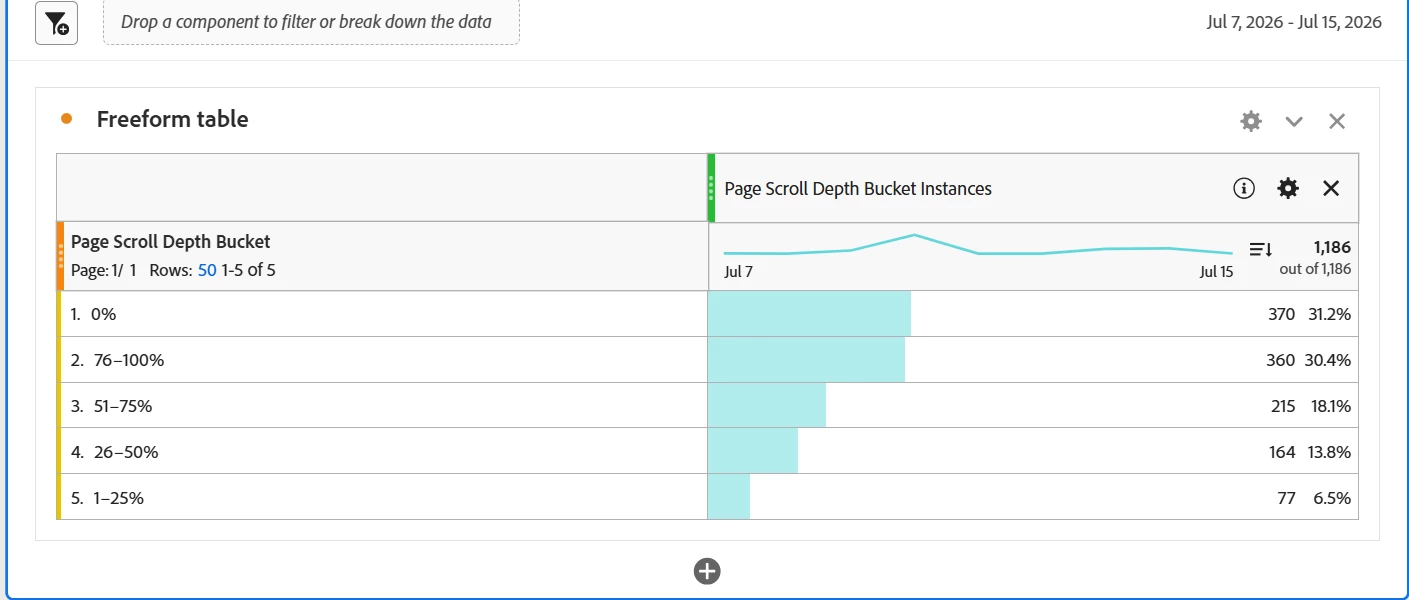
The bucket values are being populated correctly, and when I use Page Scroll Depth Bucket Instances as the metric, all traffic is categorized into the defined buckets and no Unspecified values appear.

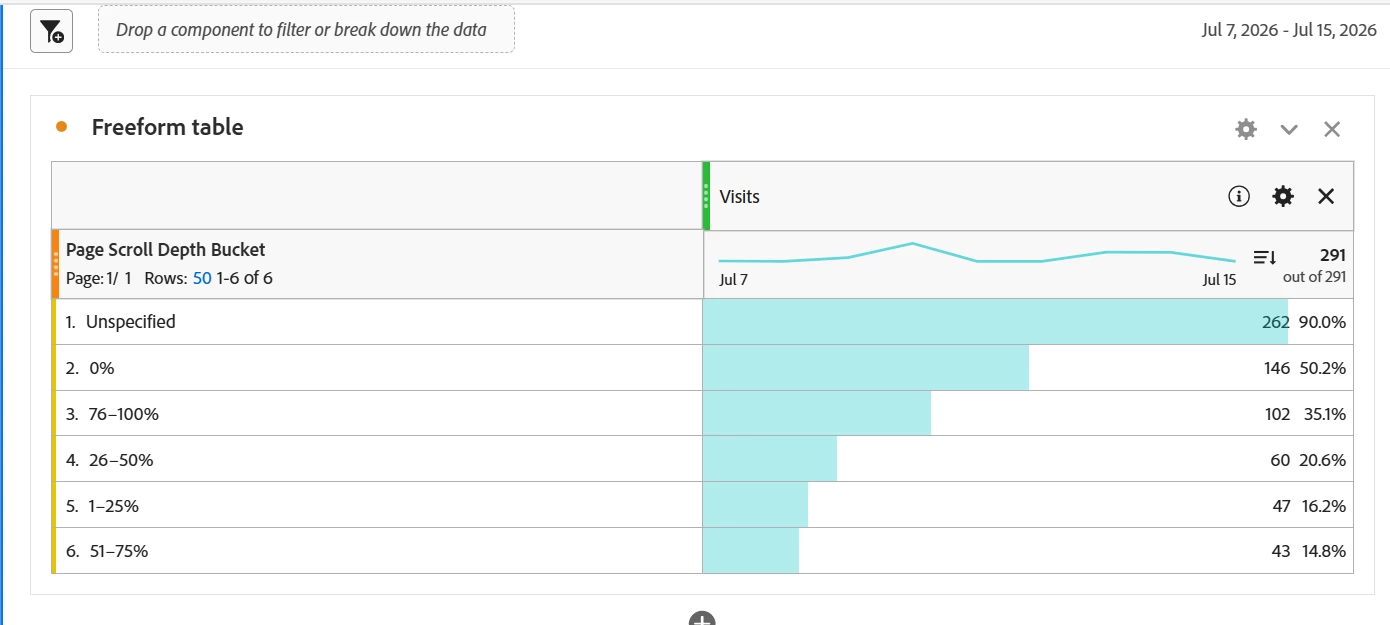
However, when I use Visits as the metric with the same dimension, I see a significant number of Unspecified values.

To reduce Unspecified values, I have also:

  • Added a 0% bucket for no-scroll scenarios.
  • Configured the scroll depth bucket to be passed into an eVar.
  • Added a fallback value so visits without scroll activity are categorized into the 0% bucket.

However, I am still seeing a percentage of traffic reported as Unspecified.

Could anyone help clarify the possible scenarios where Unspecified may still occur even when all bucket ranges are configured and a fallback value is being sent?


4 replies

Ronny3
Level 2
July 15, 2026

I’d wager that the unspecified values are from the first hits of the visits where there is not yet any scroll depth measured.

MandyGeorge
Community Advisor and Adobe Champion
July 15, 2026

This is expected behavior, and based on what you have here it looks like your component is working correctly.

When you put an evar against it’s own instances metric, you will never see unspecified because it will only show you instances where that evar was actually set. If you compare the number of instances against page views (which is where I’m assuming this is being set), the numbers should be pretty close – that can give you an idea if this is firing reliably.

The metric visits, on the other hand, will count all of the visits in your time period against the evar. Now, it is possible for an evar to have more than one value in the same visit, so if you were to add up the rows of the values (for now ignore the unspecified row, and just look at the others) it would be greater than the total. So your five bucket values together total 398, which is a lot more than your total of 291 visits. Now lets consider the unspecified. If there is even just one hit in the visit that doesn’t have scroll depth (very likely the first hit of the visit or even other types of hits like clicks/custom links), then it gets counted as unspecified. So this doesn’t mean that 262 visits didn’t have scroll depth bucketed at all, it just means that in addition to having hits with scroll depth, 262 visits had at least one hit without scroll depth.

If you go into the filter icon beside the dimension name, there is a box where you can deselect unspecified. That is what you want to do in this case, since those unspecifieds don’t add anything to your report.

Jennifer_Dungan
Community Advisor and Adobe Champion
July 15, 2026

I agree with the others. It sounds like you are tracking “scroll depth” on your page views; but this wouldn’t apply to your actions. Also, I am assuming that you are using the Adobe Scroll Depth Plugin code, this won’t fire on the first hit, but will track the maximum depth reached on the previous page.

Between your first page views and your actions, you will have unspecified values.


Unless you are doing your own thing, on the initial PV tracking “0”, then having triggers as the user scrolls down the page and tracking the depth? But again, if you only added this to your PVs and custom scroll triggers, you probably don’t have it applied to all your other actions (form completions, orders, link clicks, etc).


I agree with Mandy, not including “unspecified” in your table is probably your best option, particularly if you want to use a metric like Visits that is part of ALL hits (even ones that don’t make sense for Scroll Depth context, and those “first” hits where there is not yet any scroll depth.)

parthGupta
Level 2
July 16, 2026

I agree with ​@MandyGeorge and ​@Jennifer_Dungan. A couple of points to add that fully explain it, using the numbers from your own screenshots only:

  1. Why Instances = 0% Unspecified but Visits doesn't:
    Instances only counts occurrences where the eVar was actually set — so by definition every instance falls into a defined bucket. Visits evaluates the eVar across the entire visit, including hits where scroll depth was never set (entry hit, clicks, form submits, etc.). Any visit with even one such hit gets tagged under Unspecified, alongside whatever scroll buckets it also touched.


  1. Your own numbers prove the eVar changes value within a visit:
    Total Visits = 291, but your 5 bucket rows sum to 398 (146+47+60+43+102) — already more than the total, before Unspecified is even added. This confirms scroll depth is a Most Recent allocation eVar, and a single visit naturally passes through multiple buckets as the user scrolls further (0% → 26-50% → 76-100% in one visit = counted in all three rows).


  1. What the 262 Unspecified actually means:
    Not "262 visits with zero scroll data" — it means 262 of your 291 visits (90%) contained at least one hit with no scroll value set, most likely the entry/page-load hit itself (scroll can only be measured after the page renders) plus any non-scroll actions (clicks, form submits) in that visit.

My Recommendation:
Use Instances, not Visits, as your primary scroll-depth metric — scroll depth is a page-level concept, and Instances avoids the ambiguity, Visits introduces for any per-page eVar.