Adobe Analytics Scripts Blocked by CSP on SharePoint | Community
Skip to main content
Level 2
March 17, 2026
Solved

Adobe Analytics Scripts Blocked by CSP on SharePoint

  • March 17, 2026
  • 3 replies
  • 72 views

Hi Team,

We are working with a SharePoint website and have encountered an issue where Adobe Analytics scripts are being blocked by the Content Security Policy (CSP). Although we have already whitelisted the Adobe script, the browser console still shows an error indicating a CSP violation.

Has anyone faced a similar issue, and could you advise on how to resolve this? Any guidance on proper configuration or best practices would be greatly appreciated.
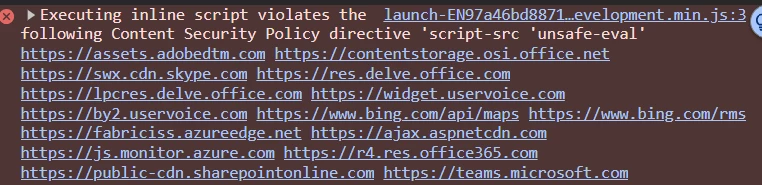
 

Thank you in advance!

Best answer by Meghan_Powers

SharePoint and Adobe do not play well at my company either.  I can sometimes get around it by opening Adobe items in an incognito window.  Otherwise, I’ve had to open an IT ticket at my company and that usually fixes it for a time.

3 replies

Jennifer_Dungan
Community Advisor and Adobe Champion
March 17, 2026

Hello ​@ManuS_ ,


I wonder if it’s the Adobe Script itself, or something that you are doing in the script...


The error message clearly specifies “unsafe-eval” which might be a result of how the script is being added to the SharePoint site?


We have SharePoint, but don’t have Adobe on it, but I am sure other people have implemented it in their sites… However, it will be hard to support this without access to the site or the code… 


Do you have any SharePoint developers in your org that can help support you?

ManuS_Author
Level 2
March 18, 2026

Yes, we do have SharePoint developers.

Jennifer_Dungan
Community Advisor and Adobe Champion
March 18, 2026

Good.. but that is definitely an interesting issue… I hope you can resolve it

ManuS_Author
Level 2
March 19, 2026

Hi Team,

We were able to resolve the issue with the following steps:

  1. Whitelisted the Adobe script.

  2. Initially, we were using the Core Extension in Adobe Launch to add custom code. We updated this to use the Adobe Analytics Extension (Set Variables) instead.

After making these changes, the CSP error is no longer appearing in the console.

Thank you all for your support and guidance!

Isha Gupta
Community Advisor and Adobe Champion
March 19, 2026

Hello ​@ManuS_ ,

I have seen this one before but not in a long time. I will check two things here.

  1. First use any CORS Unblock extension available on Chrome such as CORS Unblock to check if the scripts load fine after unblocking.
  2. Check if you have whitelisted all URLs listed in Adobe documentations-  https://experienceleague.adobe.com/en/docs/id-service/using/reference/csp

More on CSP - https://experienceleague.adobe.com/en/docs/experience-platform/collection/use-cases/configuring-a-csp


Best,

Isha