Adobe Analytics Power BI Connector Issue | Community
Skip to main content
February 13, 2024
Solved

Adobe Analytics Power BI Connector Issue

  • February 13, 2024
  • 2 replies
  • 1520 views

Hi,

Currently, I try the first time the possbilities of Adobe Analytics Data in PowerBi. But if I try to connect Adobe Analytics with PowerBi via the connector I get always the following message "Expression.Error: Start and end parameters must be of type Date or Datetime.". What I have to change in PowerBi, do you know?
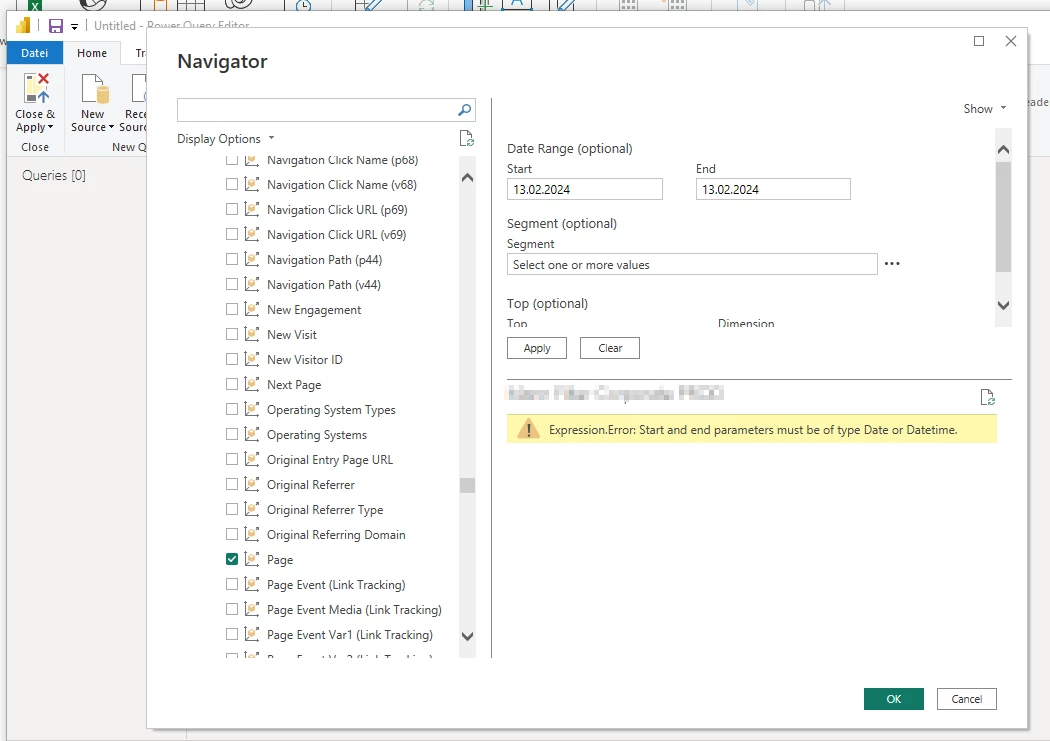
Kind regards,

Timo

This post is no longer active and is closed to new replies. Need help? Start a new post to ask your question.
Best answer by Jennifer_Dungan

Yeah, I figured... it's just that the error seems to be around the dates provided "not being in date format".


What about the Date Format in Adobe? Maybe the error is coming from from there? And you have to match whatever date format is set up in your Adobe, rather than the date format in PBI?


The error message isn't very helpful right now in explaining why it thinks the dates aren't in date format, or what format it expects....

2 replies

Jennifer_Dungan
Community Advisor and Adobe Champion
February 13, 2024

I don't us Power BI, but could the issue be the formatting of your dates?


Have you tried MM/DD/YYYY format?


DD.MM.YYYY isn't really a "standard" date format that I've seen.. unless you've changed the settings in Power BI, it's possible that it just doesn't understand that format? It may even be that custom date settings in Power BI don't work in that interface?


TimoSt1Author
February 22, 2024

Hi Jennifer,

First of all, thank you for your answer.

Unfortunately, the date format is not the reason for. The selected format is local setting (in my case German) of PBI. But, if I set that to another format (e.g. Englisch US) it don't fix it and the message is still the same.

KR,

Timo

Jennifer_Dungan
Community Advisor and Adobe Champion
Jennifer_DunganCommunity Advisor and Adobe ChampionAccepted solution
Community Advisor and Adobe Champion
February 22, 2024

Yeah, I figured... it's just that the error seems to be around the dates provided "not being in date format".


What about the Date Format in Adobe? Maybe the error is coming from from there? And you have to match whatever date format is set up in your Adobe, rather than the date format in PBI?


The error message isn't very helpful right now in explaining why it thinks the dates aren't in date format, or what format it expects....

July 31, 2024

Is there a way to set the date range from a static date to current date?

For an example; start date 3/13/2024 to today. 
If I automate it I need to pull data up to today going forward.