Add time period and compare time period options not showing on Adobe Analytics | Community
Skip to main content
Level 5
November 18, 2022
Question

Add time period and compare time period options not showing on Adobe Analytics

  • November 18, 2022
  • 2 replies
  • 1020 views

Hi again!

I just watched the live "Adobe Experience League Live: Analytics in the office or on the go" (thanks, was helpful) and saw Eric talking about the compare time period and add time period options. It does not appear for me so I asked if this option was available for everybody, which I was answered that it was.
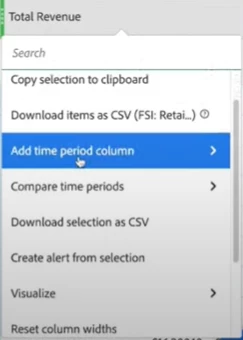

I even tried using the same metric shown in the live to double-check:
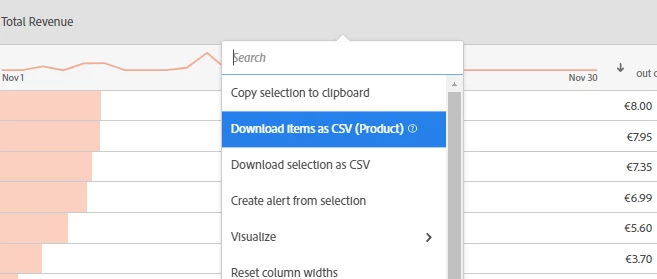
Any idea why? @ericmatisoff1 


This post is no longer active and is closed to new replies. Need help? Start a new post to ask your question.

2 replies

kayawalton
Community Advisor and Adobe Champion
November 18, 2022

Are your rows broken down by time periods (day, hours, months, etc)? If so, this option would not be available. If you replace the rows with a dimension, you should be able to see that option when you right-click on the column header.

fern1Author
Level 5
November 18, 2022

My rows are broken down by the product dimension. That's why I am finding it weird.


yuhuisg
Community Advisor
Community Advisor
November 19, 2022

Your AA SKU might not support this feature. See the note at https://experienceleague.adobe.com/docs/analytics/analyze/analysis-workspace/components/calendar-date-ranges/time-comparison.html?lang=en#section_C4E36BFE0F5C4378A74E705747C9DEE4 .


Compare Time Periods leverages advanced Calculated Metrics. As a result, it is available only to customers with Analytics Select, Prime, and Ultimate SKUs.