Activitymap - store activity map elements as a Data Element in Adobe Launch | Community
Skip to main content
March 30, 2021
Solved

Activitymap - store activity map elements as a Data Element in Adobe Launch

  • March 30, 2021
  • 2 replies
  • 1497 views

Hi all,


I would like to store Activitymap elements (region, page, link) as a Data Element in Adobe Launch and store it as an evar on the following pageload (where the standard ActivityMap elements are passed. How can I do that? I tried to do it in different ways, but always failed until now...


Many thanks!
Pavel
This post is no longer active and is closed to new replies. Need help? Start a new post to ask your question.
Best answer by Brian_Johnson_

One option might be to use dynamic variables to populate your eVar. For example, if you're looking to capture the "region" key in eVar1, you'd populate eVar1 as shown below:


s.eVar1="D=c.a.activitymap.region"


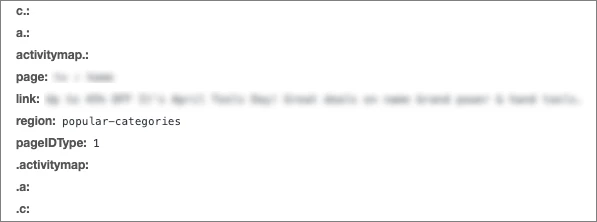
Assuming the following values are captured in the activity map context data variables as shown below, "popular-categories" would be passed to eVar1 and accessible for reporting. 


UPDATE: You have to reference the full path - with dot notation - for this. Each activity map property would be preceded by "c.a.activitymap." as shown below:

  • c.a.activitymap.page
  • c.a.activitymap.link
  • c.a.activitymap.region
  • c.a.activitymap.pageIDType

Dynamic variables: https://experienceleague.adobe.com/docs/analytics/implementation/vars/page-vars/dynamic-variables.html?lang=en#vars

2 replies

yuhuisg
Community Advisor
Community Advisor
March 31, 2021

AA's Processing Rules might be a better option for you. You can setup a Rule that sets your eVar with the relevant Activity Map Contextual Variable value.

Brian_Johnson_
Brian_Johnson_Accepted solution
Level 8
March 31, 2021

One option might be to use dynamic variables to populate your eVar. For example, if you're looking to capture the "region" key in eVar1, you'd populate eVar1 as shown below:


s.eVar1="D=c.a.activitymap.region"


Assuming the following values are captured in the activity map context data variables as shown below, "popular-categories" would be passed to eVar1 and accessible for reporting. 


UPDATE: You have to reference the full path - with dot notation - for this. Each activity map property would be preceded by "c.a.activitymap." as shown below:

  • c.a.activitymap.page
  • c.a.activitymap.link
  • c.a.activitymap.region
  • c.a.activitymap.pageIDType

Dynamic variables: https://experienceleague.adobe.com/docs/analytics/implementation/vars/page-vars/dynamic-variables.html?lang=en#vars