ActivityMap.region override - clicked element value is 0 | Community
Skip to main content
Level 2
September 22, 2025
Question

ActivityMap.region override - clicked element value is 0

  • September 22, 2025
  • 1 reply
  • 482 views

Hello,


We have set up Adobe Analytics with Activity Map through Adobe Launch and overriding the Activity Map region using the following:
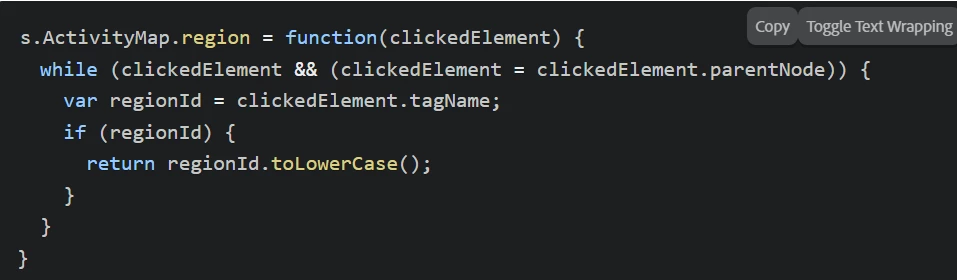
I found the above code example from ActivityMap.region | Adobe Analytics and it works as expected for most of the links on our website. However, for some links/buttons, the value of clickedElement appears to be 0 instead of the actual HTML DOM element object.


Screenshot:
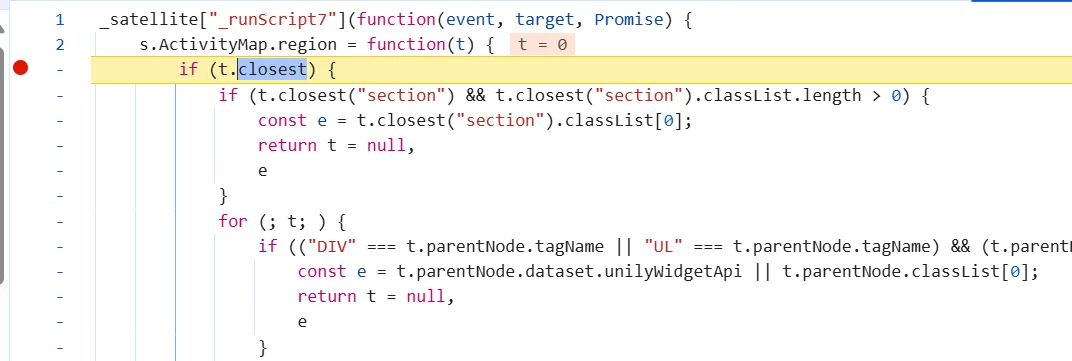
 

Please help me understand what the reason could be. Any help would be highly appreciated.


Regards,

Saif


This post is no longer active and is closed to new replies. Need help? Start a new post to ask your question.

1 reply

Jennifer_Dungan
Community Advisor and Adobe Champion
September 22, 2025

Unfortunately, since this is custom code for a site I don't have access to, trying to debug this is going to be hard.


However, here is my recommendation:


Since you already seem to be running a watch in your code to see the final result, I would suggest trying to dig further into the logic that is being run, trying to see what is happening at each step... (i.e. is there a value that ends up being overwritten, or maybe the logic doesn't properly cover the elements and so there is no value to be set, with no fallback - like the standard "BODY")


I have custom code to support the Activity Map Link, but not the Region (for that, I have a data attributes in our HTML to set the regions with a little more control) (https://experienceleague.adobe.com/en/docs/analytics/implementation/vars/config-vars/activitymap-regionidattribute#sactivitymapregionidattribute-using-appmeasurement)