


Accidently deleted a workspace project? Here's the miracle that can bring it back!
If a workspace project has been permanently deleted, how can it be possible to bring it back??
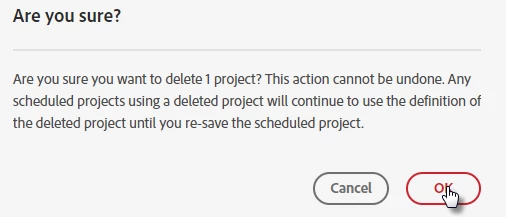
The truth is that when you hit 'delete' Adobe doesn't seem to actually delete the workspace project(!) - they just remove all links to the workspace making it impossible to navigate to. So, if you know how to navigate back to the workspace the good news is, it's still sitting there waiting for you.
How do I navigate back to the workspace?
The URL of workspace projects follow a standard format. While you are in a workspace project you can see a long alpha-numeric string at the end of the URL (Highlighted in yellow below).
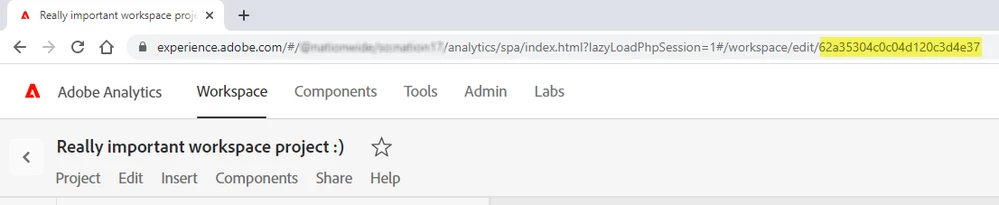
This is the unique ID for the project you are viewing. If you know what the project ID is for the project you want to restore, you can simply:
- navigate to one of your other projects
- replace the project ID in the URL and load the page (Your deleted project will appear)
- Save the project - your project has now been restored!
But how on earth am I going to find out the project ID if I've just deleted it?!!!
Fortunately, every time you do something with a workspace project (including when you delete a project!) an audit log is created in the "Usage & Access Log". Critically, this audit log also includes the project ID (highlighted in yellow below).
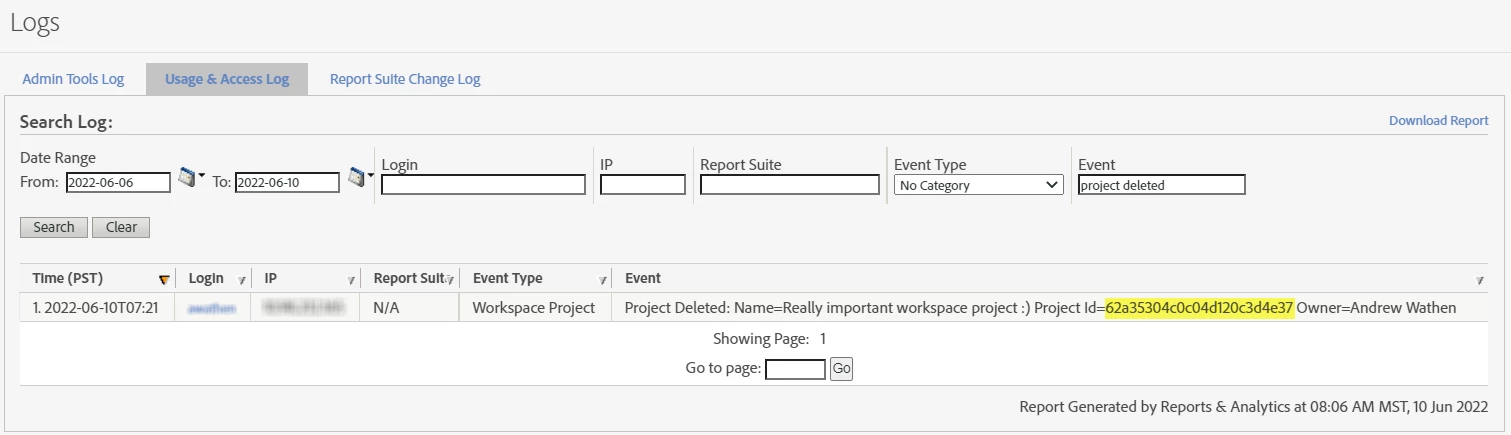
Therefore, all you need to do is to go and find the project ID from the audit log and you are good to go (and while you are there you might as well find out who deleted it in the first place 😁)
Hope this helps.
If you've found this useful, please don't forget to hit 'like' - if I know people are getting value from these blog posts I'm more likely to write more 🙂
***DISCLAIMER***
This is not an Adobe 'approved' method, so I make no promises that this is always going to work, but I hope this is able to get you out of a bad situation if you need it.