
TimBo4
Level 2
September 9, 2026
Question

A4T & Unspecified activity conversions

  • September 9, 2026
  • 5 replies
  • 71 views

We are investigating an issue related to Unspecified values and are trying to determine whether we're encountering a configuration issue, a data collection issue, or a platform limitation.

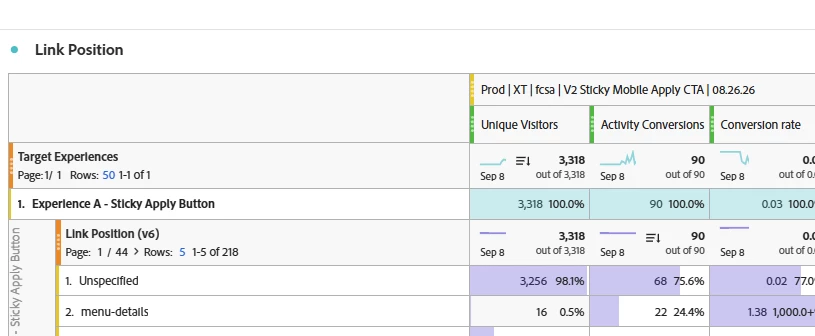
In the example below, some conversions are successfully attributed to the menu-details dimension using Link Position, while 68 other conversions appear as Unspecified and cannot be tied back to a dimension.

Why would some conversions be attributable to a dimension such as Link Position or Link Name, while others remain Unspecified? Is it reasonable to expect that most click-tracking conversions should be definable and reportable against a link dimension, or are there scenarios where Unspecified is the expected behavior?

More specifically, can Target users define click-tracking conversion metrics using link-level dimensions such as Link Position and/or Link Name, and are there any known limitations that would prevent these dimensions from being available for certain conversions?
 

5 replies

Arturo-Rivero
Adobe Champion
Adobe Champion
September 9, 2026

Hi ​@TimBo4,

I believe this probably isn't a data loss problem. Unspecified just means nothing was set on the hit that carried the conversion, so the real question is which hit was that.

A couple of things I'd look at first.

Your Link Position is a custom eVar (v6) rather than a built-in link dimension, so it will behave however you configured it. I would recommend checking its allocation and expiration in Report Suite Manager, under Conversion Variables. If it expires on Hit, it can only attribute a conversion that happens on the same hit as the click, and everything else drops into Unspecified. This behavior would then be expected.

Next, I'd try to work out whether those 68 conversions touched a link at all. Break the same Target Experiences row down by the standard Custom Link dimension. Link hits will populate it, either with the link name or the URL if no name was passed, and page views don't.

If Custom Link comes back blank for those 68 too, then this means that these conversions weren't clicks. Your goal metric is firing on a page view, so no link dimension can describe them and there's nothing broken to chase. If Custom Link does have values while Link Position doesn't, the hits are there and your eVar isn't riding along with them. I'd check that eVar6 is in s.linkTrackVars, and that the beacon isn't getting killed by the navigation (s.useBeacon = true, or Web SDK).

On your other questions. I wouldn't expect click conversions to carry a link dimension unless the conversion event fires on the same s.tl() call that sets it. And unfortunately Target can't build a click metric out of an Analytics dimension. Target click metrics are element-based, defined by selecting the element in the Visual Experience Composer. With A4T you pick an Analytics metric as your goal, but you can't make a metric from a dimension. If link position attribution is what you're after, the cleaner route is to fire your own event on the same tl() call as eVar6 and use that as the goal metric.

Happy to go deeper if you can share how the goal metric is configured, since that's what decides which of the two branches above you're in.

Looking forward to hearing back!

Arturo Rivero
manpreetkaur27
Adobe Support
Adobe Support
September 18, 2026

Hey ​@TimBo4 Do you have any further updates for ​@Arturo-Rivero 

Jennifer_Dungan
Adobe Champion and Community Advisor
September 18, 2026

I agree, and I just want to add something…


The nature of eVars is such that whether they are hit based, or Visit level expiration (or some other expiration)… ANY hit on the site that doesn’t pass a value (and has no previous retention) will show “Unspecified”. Also, it seems like your eVar is specifically tied to an interaction hit, which means your Page Views wouldn’t have value.


For example, in a visit based expiry:

  • Page A
    • eVarX = “” (this will show as “Unspecified”)
  • Page A - Click X
    • eVarX = “X”
  • Page B
    • eVarX retains value “X”


And in a Hit Expiry

  • Page A
    • eVarX = “” (this will show as “Unspecified”)
  • Page A - Click X
    • eVarX = “X”
  • Page B
    • eVarX = “” (this will show as “Unspecified”)


Since you have Unique Visitors as one of your metrics, you will definitely show “Unspecified” in your report because of the page views that have no interaction value. Now, you do seem to have some “conversions” also with unspecified… without knowing what you are doing, I can only guess at what is happening… it’s possible your conversions are firing where they shouldn’t? Or the value isn’t being set properly… this is something you will have to test and investigate.


We can’t see the full table, do the other values combined also add up to 90? Meaning that the Unspecified Conversions could just be a result of the data stitching? Are these Merchandising events / dimensions? When it comes to merchandising, the mappings can often show a “duplication” of Unspecified. I would try unchecking “Include unspecified (none)” on your eVar and see how that impacts the report:


Level 2
September 18, 2026

Hi ​@TimBo4 

I think this could be related to how Link Position is being set and persisted, since it is an eVar.

If Link Position is not set for some clicks/conversions, those conversions can appear as Unspecified. Also, if it is set on an earlier hit, its value may persist to later hits depending on the eVar's expiration settings.

In your example, 22 conversions are attributed to menu-details, while 68 are Unspecified. I would therefore check a few of those 68 conversions and verify:

  • Whether Link Position was set on the relevant click.
  • The expiration/persistence setting of the Link Position eVar.
  • Whether the value was still available when the Target conversion occurred.

If the value was correctly collected and persisted but is still showing as Unspecified, then I would look into the A4T classification.

So, I wouldn't necessarily expect all Target conversions to have a Link Position value. It depends on whether the eVar was set and available for that conversion.

Anonymous_badger
Level 2
September 18, 2026

​@TimBo4 following up on my ask above, can you share how the Target conversion is configured?

The idea from my response is that to better help you, I would like to know how are conversions happening on the page:

  • Does evar6 fire on the same hit as the conversion?
  • Does it expire after the visit or the hit? 
  • Is your Target conversion configured properly to fire on the click of a link?
  1. If it’s configured to expire after the hit, and the conversion happens in the following hit, then v6 will equal ‘Unspecified’.
  2. If your conversion can be triggered by an action different than a link click (for example: scroll event, an engagement click, accordion, slider, toggle, or page view), then this would cause v6 to also equal ‘Unspecified’ because no value exists to be captured.

Looking forward to more details on your Target activity.


Arturo Rivero