I’m working on a 6sense + Adobe Launch integration and facing an issue with how data appears in Adobe Analytics reporting.
Current Implementation
On a first‑time visit, the page loads normally and fires a page view call, followed by a non‑page view call that contains the 6sense attributes (stored in eVars).
I’m trying to avoid delaying the page‑view call. If anyone knows how to include 6sense attributes in the initial page‑view call without delaying it, please suggest.
On a return visit, I merge the 6sense eVars into the page‑view call.
Problem
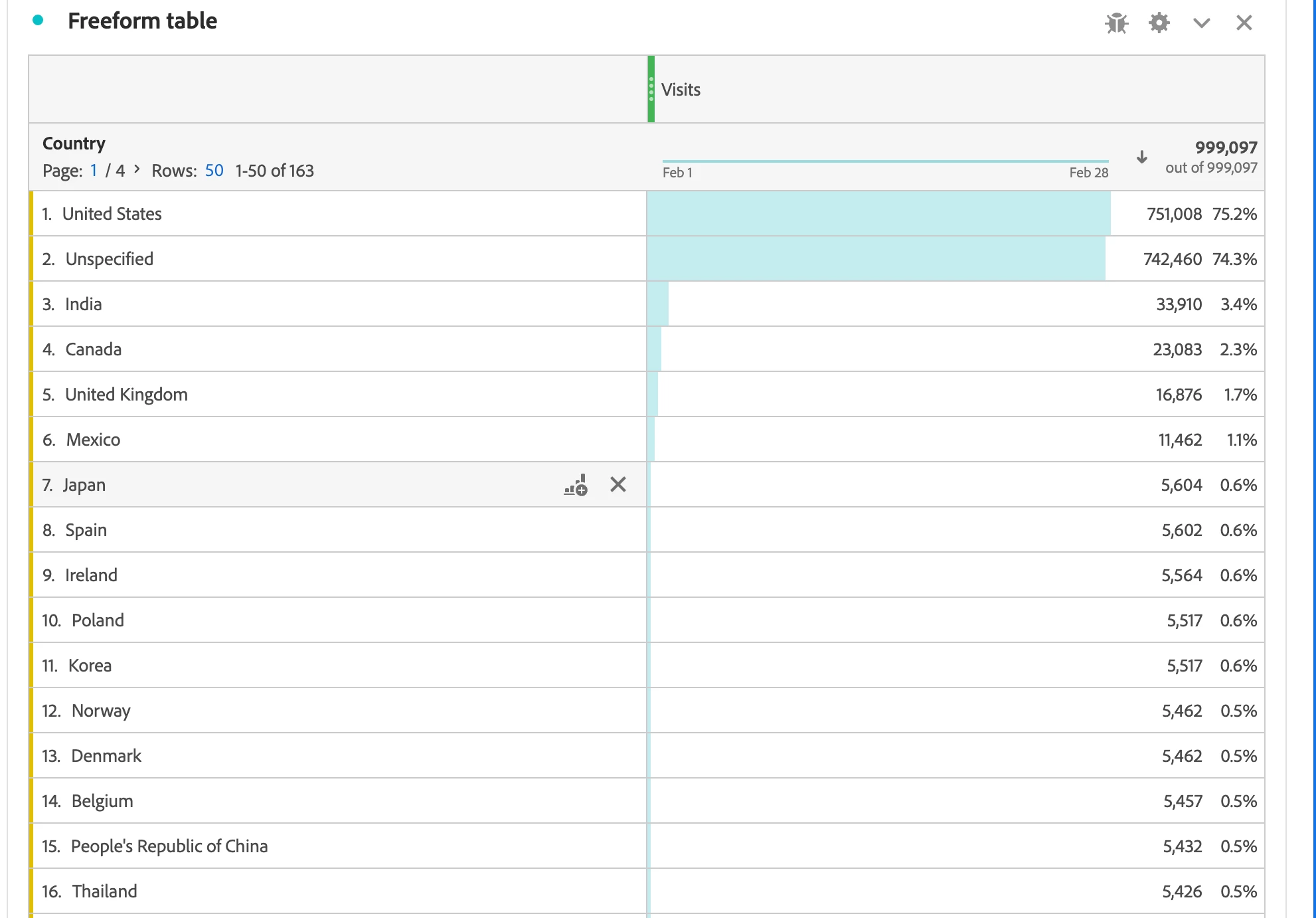
In reporting, I see unexpected behavior. Example: In the Country dimension, United States and Unspecified both show 70%+ for Visits—together exceeding 100%. (Refer to attached screenshot.)
Any best practices to include 6sense attributes in the initial page‑view hit without delaying it?
Neither is ideal (one inflates your server calls and costs, one has more potential to lose tracking), so you need to choose your poison…
While we are not using 6sense, we have other integrations that the data doesn’t appear immediately… we chose to delay tracking. However, I do not have an arbitrary wait “x milliseconds and hope the information is there” approach… I did some custom code that does a loop (checking every 100 or 300 milliseconds) for the info to exist, when it’s found - my code proceeds to read it, set my variables and then send the tracking…. If the info can’t be found in a reasonable time, then tracking proceeds without that information (so that I don’t lose all my tracking for the page).
In my case, many of these integrations only appear on specific page types, so I created logic to only run those “checks” for the info on pages where it makes sense…. if it’s not that page, then I bypass the loop check completely, so that tracking doesn’t get delayed.
The approach you take has to be a decision based on how your site works, the average “delay” for your data, and if you want to prioritize costs or tracking everything as soon as possible.
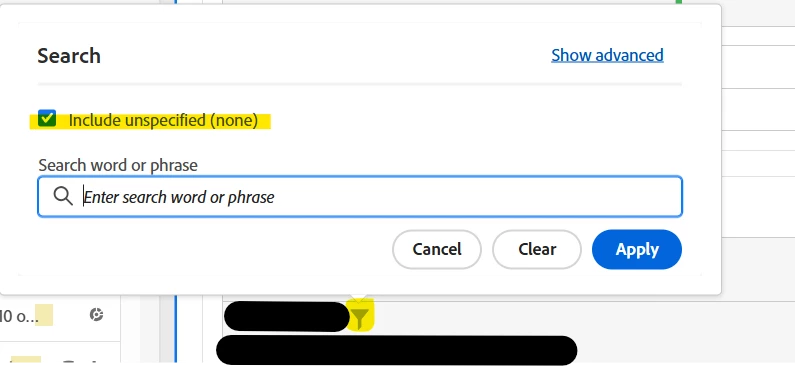
However, in your existing setup, those “Unspecified Visits” are based on the PVs without the 6sense data… but they are not contributing to overall “Visit Total” (they are duplicates shown for the breakdown). For this table, you can literally just change the settings to not show “Unspecified”.
It’s no different than the following scenario:
Visit 1:
Page A
Page B
Visits
Page
1
Page A
1 1oo%
Page B
1 1oo%
Page A was part of a visit, Page B was part of a visit, but they are still part of the same single visit, and the total reflects that, the total does not show “2”. The % is a simple division (row value / deduplicated total)… In my simple example, I see 100% for both, because both pages were part of the one visit I am looking at…
In your case, you probably don’t have a lot of “cross country” data (unless someone is on their cell phone, on a plane, crossing country borders, during their visit)… But, it’s still possible that if you added all of the real country data, it still might exceed 100%.
This report is a prime example of when hiding “unspecified” should be used.
To be honest, I would avoid introducing dependencies between tools, meaning waiting for an asynchronous response from 6sense for the sake of complete data. This could potentially significantly delay your analytics call, if any third party service has a slow response or outage, leading to lost analytics data.
I implemented it for a client a while back, and we had the same discussions.
As you have correctly set it up with eVars, the values will be available from the second call on, meaning your Visits can be broken down by the 6sense variables, which should be already answering most of your questions.
Neither is ideal (one inflates your server calls and costs, one has more potential to lose tracking), so you need to choose your poison…
While we are not using 6sense, we have other integrations that the data doesn’t appear immediately… we chose to delay tracking. However, I do not have an arbitrary wait “x milliseconds and hope the information is there” approach… I did some custom code that does a loop (checking every 100 or 300 milliseconds) for the info to exist, when it’s found - my code proceeds to read it, set my variables and then send the tracking…. If the info can’t be found in a reasonable time, then tracking proceeds without that information (so that I don’t lose all my tracking for the page).
In my case, many of these integrations only appear on specific page types, so I created logic to only run those “checks” for the info on pages where it makes sense…. if it’s not that page, then I bypass the loop check completely, so that tracking doesn’t get delayed.
The approach you take has to be a decision based on how your site works, the average “delay” for your data, and if you want to prioritize costs or tracking everything as soon as possible.
However, in your existing setup, those “Unspecified Visits” are based on the PVs without the 6sense data… but they are not contributing to overall “Visit Total” (they are duplicates shown for the breakdown). For this table, you can literally just change the settings to not show “Unspecified”.
It’s no different than the following scenario:
Visit 1:
Page A
Page B
Visits
Page
1
Page A
1 1oo%
Page B
1 1oo%
Page A was part of a visit, Page B was part of a visit, but they are still part of the same single visit, and the total reflects that, the total does not show “2”. The % is a simple division (row value / deduplicated total)… In my simple example, I see 100% for both, because both pages were part of the one visit I am looking at…
In your case, you probably don’t have a lot of “cross country” data (unless someone is on their cell phone, on a plane, crossing country borders, during their visit)… But, it’s still possible that if you added all of the real country data, it still might exceed 100%.
This report is a prime example of when hiding “unspecified” should be used.