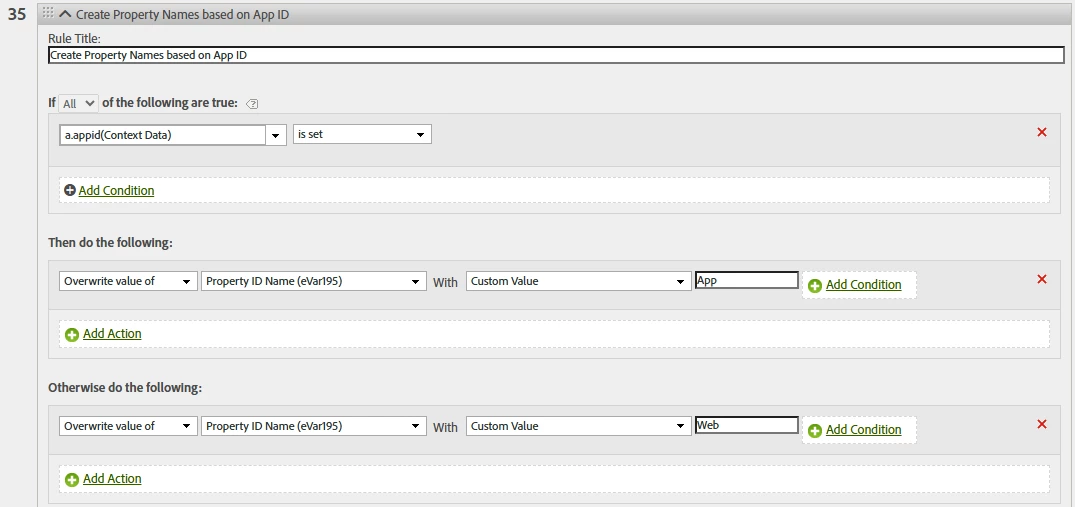
Processing Rules are pretty simple (as you can see).. there is no If...else if... else if... etc... else logic...
There is the "add condition" to each item, that can be used as an additional classification, but you can only have one check here (not multiple, like on the main rule)
That said, you can get creative by stitching together logic, using the rules and the conditions to "optimize" your rules (I put that in quotes, because it can be harder to create and follow, but it does keep the overall rules down... it's a "six of one, half a dozen of the other" situation).
I am not sure your final intended result, but here is a simple example:
I am not sure what values you want, so I will just use placeholder values.
Rule: X
Condition 1
Condition 2
Then:
Overwrite value of eVar1 with "value 1"
If eVar2 equals "something1"
Overwrite value of eVar1 with "value 2"
If eVar2 equals "something2"
Overwrite value of eVar1 with "value 3"
If eVar5 equals "anotherValue"
Overwrite value of eVar1 with "value 4"
If pageURL contains "foo"
Basically, the Rule conditions must be met for the rule to trigger (either ALL rules, or Any depending on your needs), then you can add one additional qualification to the individual item... you can do this in the "otherwise" section as well.
I rarely use the "Otherwise"... most of my rules are set up with Common Rule conditions, and then specific conditions on each item..