How do I move a folder to an other folder? | Community
Skip to main content
Level 2
May 21, 2021
Solved

How do I move a folder to an other folder?

  • May 21, 2021
  • 3 replies
  • 1696 views

Hello,


I am reorganizing my folder structure.

Therefore I want to move folders, containing traits or segments, to an other (new) folder.

How do I do this?

This post is no longer active and is closed to new replies. Need help? Start a new post to ask your question.
Best answer by Rachit_Sachdev

Hi @pietervankerckhoven ,


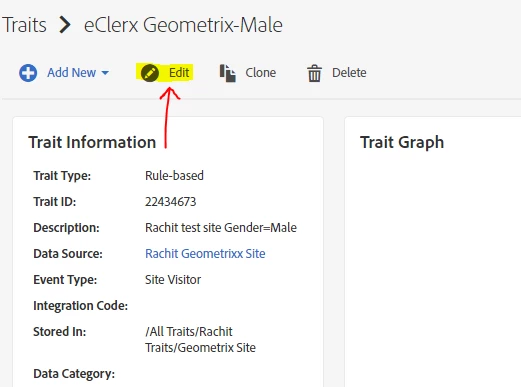
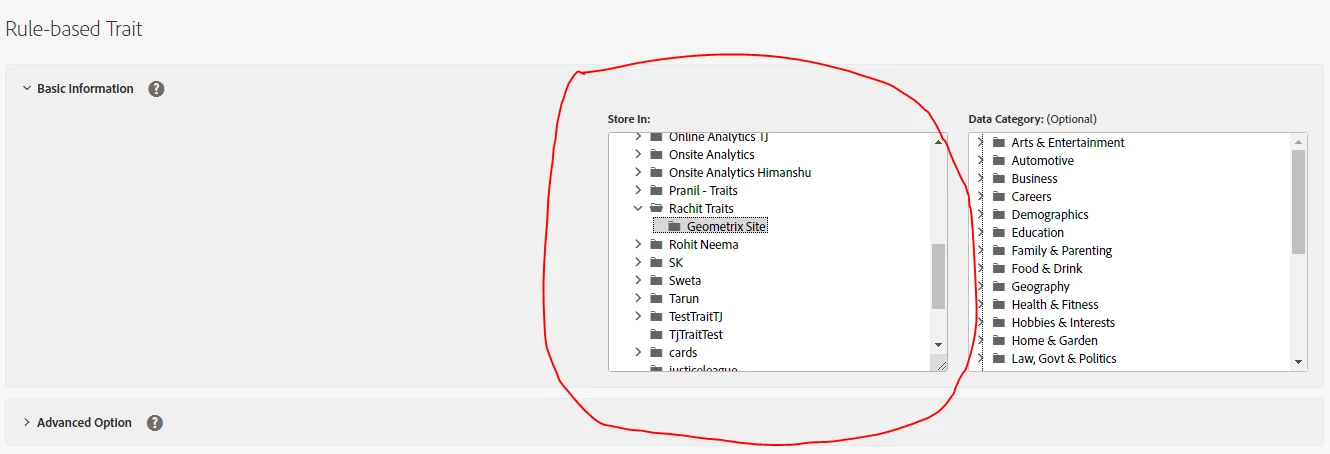
You can move the traits/segments from one folder to another by editing the Trait/segment and choosing the new location of your Trait/segment.


Auto created Traits from Analytics will not be allowed to be changed as they are system generated.


Thanks,

Rachit Sachdev

3 replies

Rachit_Sachdev
Rachit_SachdevAccepted solution
Level 2
May 21, 2021

Hi @pietervankerckhoven ,


You can move the traits/segments from one folder to another by editing the Trait/segment and choosing the new location of your Trait/segment.


Auto created Traits from Analytics will not be allowed to be changed as they are system generated.


Thanks,

Rachit Sachdev

Level 3
June 15, 2021
hi, you can use bulk tools to reorganise the folder structure (you can move whole folders themselves, as well as moving traits from one folder to another) https://experienceleague.adobe.com/docs/audience-manager/user-guide/reference/bulk-management-tools/bulk-management-intro.html?lang=en
Level 2
June 28, 2021

Using BAAAM you just update by editing the parent folder and run an update. Only beneficial in a cost/benefit perspective to use BAAAM if you are aiming for moving a lot. Else it would be time efficient to just edit/move in the AAM UI.