
Web SDK configuration - return empty string | Community
Skip to main content
Michael_Soprano
Level 10
February 13, 2026
Solved

Web SDK configuration - return empty string

  • February 13, 2026
  • 2 replies
  • 40 views

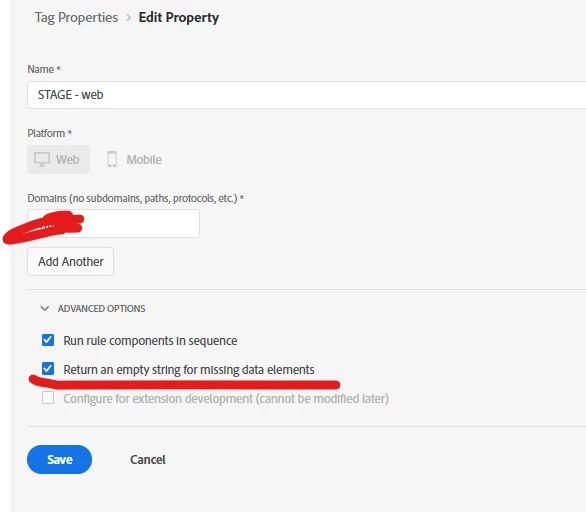
Assume that my Data Element is not found on a page - Web SDK would return error. 

There this functionality would prevent such a situation? Do you turn this on on your implementations? 
 

Best answer by arpan-garg

Hi ​@Michael_Soprano  - Yes this should work the same way as described, if the data element is used within a rule and is not defined in library you will get undefined, using this checkbox will make sure empty is returned.

2 replies

arpan-garg
Community Advisor
arpan-gargCommunity AdvisorAccepted solution
Community Advisor
February 16, 2026

Hi ​@Michael_Soprano  - Yes this should work the same way as described, if the data element is used within a rule and is not defined in library you will get undefined, using this checkbox will make sure empty is returned.

bjoern__koth
Community Advisor and Adobe Champion
February 17, 2026

What I am missing in the Web SDK Extension is an auto-cleanup mechanism that removes empty attributes from the XDM to make this type of question redundant.

Cheers from Switzerland!
AmitVishwakarma
Community Advisor
Community Advisor
February 20, 2026

Hi ​@Michael_Soprano ,
Yes – that property setting “Return an empty string for missing data elements” will prevent the “data element not found” case from surfacing as undefined and breaking your Web SDK rule logic. When a data element can’t resolve, Tags will return "" instead of undefined/null.

But:

In most implementations I’ve seen, teams don’t turn this checkbox on globally, they prefer:

  • Per–data-element default values, and/or
  • A small onBeforeEventSend cleanup to remove empty attributes.

Thanks,
Amit

Amit Vishwakarma - Adobe Commerce Champion 2025 | 16x Adobe certified | 4x Adobe SME